

What is Agentex Tracing?
Modern AI agents execute complex, multi-step workflows: reasoning, calling tools, making LLM requests, and coordinating with other agents. Without tracing, these workflows are opaque. When something goes wrong or runs slowly, you’re left guessing. Agentex Tracing gives you deep visibility into your Temporal-style agents by capturing structured spans for every meaningful operation. You get:- One trace per task:
trace_idmaps directly to your Agentextask_id - A structured span hierarchy: turns, LLM calls, tool invocations, and custom logic all nest via
parent_id - Tool and model I/O capture: see exactly what went into and came out of each operation
- Profiler-ready data: consistent span naming enables aggregated performance analysis across all your traces
This guide covers tracing specific to Agentex agents. For general tracing concepts (spans, traces, the Traces UI), see Introduction to Tracing.
Architecture
Key Identity Relationships
Core Concepts
trace_id = task_id
Every Agentex task has a unique ID. This same ID becomes thetrace_id for all spans associated with that task. This 1:1 mapping means you can look up any task’s full execution history by searching for its task_id in the Traces UI.
Span Hierarchy
Spans form a tree viaparent_id relationships. A turn-level span is the parent of the LLM calls and tool invocations that happen during that turn. This hierarchy is what the Traces UI renders as an expandable tree and Gantt chart.
Span Data Model
Quick Start
1
Initialize Tracing in Your acp.py
Add the tracing initialization at the top level of your The three required environment variables:
acp.py (or workflow.py for Temporal agents). This runs once when the agent process starts and configures both the Agentex and SGP tracing processors so spans appear in the SGP Traces UI.2
Create a Turn Span
Wrap each conversation turn in a manual span. This groups all LLM calls and tool invocations for that turn.
3
Make a Traced LLM Call
Pass
trace_id and parent_span_id to your LLM call. The built-in providers auto-create a child span.4
View in the Traces UI
Open the SGP Traces page, filter by your agent name, and click on the trace. You should see your turn span with the LLM call nested beneath it.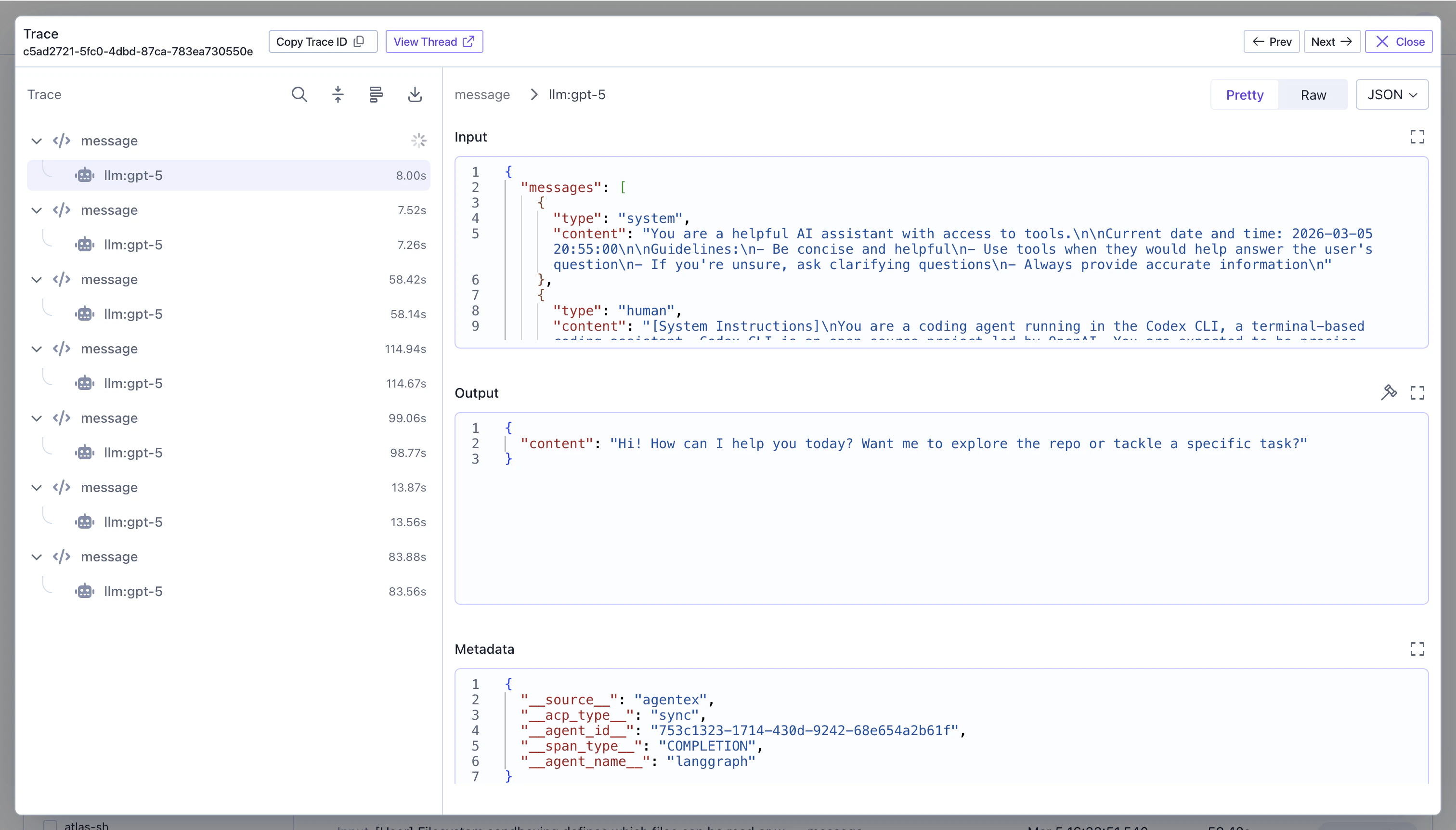
For a complete reference on the SGP Tracing SDK, see Creating Traces and Spans.
The Two Tracing Systems
Agentex Native Tracing (adk.tracing)
This is the primary system for Temporal agents. Spans are sent to the Agentex backend API.
adk.tracing.span()creates a span with a UUID4 id- On start: calls
POST /spansto create the span in the Agentex database - On end: calls
PATCH /spans/{id}to update with output and end_time - If inside a Temporal workflow: routes through Temporal activities instead of direct HTTP
SGP Tracing (scale_gp_beta.lib.tracing)
This is the SGP platform’s native tracing SDK. You can use it directly or as a dual-write processor alongside Agentex tracing.
- The SGP processor intercepts Agentex span events
- Converts to SGP span format via
scale_gp_beta.lib.tracing.create_span() - Adds metadata:
__source__: "agentex",__agent_name__,__agent_id__,__acp_type__ - Flushes to the SGP backend via
upsert_batch()
Which Should You Use?
- For Temporal agents: Use
adk.tracing.span(), which handles Temporal activity routing automatically - For standalone scripts: Use
scale_gp_beta.lib.tracing.create_span()directly - For dual-write: Configure both processors (Agentex processor is the default; add the SGP processor for SGP UI visibility)
Next Steps
- Want to understand what’s auto-traced for you? See the Built-in Tracing Providers guide for OpenAI Agents SDK, LiteLLM, and LangGraph coverage and gaps.
- For naming conventions, input/output patterns, and profiler-friendly trace structure, see Span Hierarchy & Best Practices.
- Building a multi-agent system? See Multi-Agent Tracing to propagate trace context across orchestrator and sub-agents.
- For general tracing concepts and the SGP Tracing SDK, see Introduction to Tracing and Creating Traces and Spans.
- To understand the Traces UI, see the Traces Table, Profiler, and Trace Detail View pages.
- New to Agentex? Start with the Agentex Overview and Agentex Agent Types.