

1. Instantiate Client
1. Instantiate Client
Follow the instructions in the Quickstart Guide to setup the SGP Client
from scale_gp import SGPClient
ACCOUNT_ID = ... # fill in here
SGP_API_KEY = ...
client = SGPClient(
api_key=SGP_API_KEY,
account_id=ACCOUNT_ID,
)
2. Setup a Application and Evaluation Configuration
2. Setup a Application and Evaluation Configuration
We’ll be creating an application to answer math questions — we’ll go through multiple variants of this application. When we evaluate each variant, we’ll need an evaluation config.Let’s create both now.
# create an application spec, which groups together all the different iterations of an application
math_app = client.application_specs.create(
account_id=ACCOUNT_ID,
name="Mathbot",
description="An application that can answer math/finance questions.",
)
# Create an evaluation configuration with 2 questions to ask the evaluators
# One for the accuracy of the final answer, and one for the quality of the reasoning to get to the final answer
question_requests = [
{
"type": "categorical",
"title": "Final Answer Accuracy",
"prompt": "Rate the accuracy of the Final Answer",
"choices": [{"label": "1 - Inaccurate", "value": "1"}, {"label": "2 - Partial", "value": "2"}, {"label": "3 - Perfect", "value": "3"}],
"account_id": ACCOUNT_ID,
},
{
"type": "categorical",
"title": "Reasoning Quality",
"prompt": "Rate the quality of the Reasoning to Get to the Final Answer",
"choices": [{"label": "0 - Not Applicable", "value": "0"}, {"label": "1 - Low Quality", "value": "1"}, {"label": "2 - Partial", "value": "2"}, {"label": "3 - Perfect", "value": "3"}],
"account_id": ACCOUNT_ID,
},
]
question_ids = []
for question in question_requests:
q = client.questions.create(
**question
)
question_ids.append(q.id)
print(q)
q_set = client.question_sets.create(
name="test question set",
question_ids=question_ids,
account_id=ACCOUNT_ID,
)
evaluation_config = client.evaluation_configs.create(
account_id=ACCOUNT_ID,
question_set_id=q_set.id,
evaluation_type='human',
)
3. V0: A naive math chatbot
3. V0: A naive math chatbot
from scale_gp.lib.external_applications import ExternalApplication, ExternalApplicationOutputCompletion
def mathbot_v0(input: str) -> str:
response = client.chat_completions.create(
messages=[
{
"role": "user",
"content": input
}
],
model="gpt-4o-mini",
)
print("Question:", input, "Answer:", response.chat_completion.message.content)
return ExternalApplicationOutputCompletion(generation_output=response.chat_completion.message.content)
from scale_gp.lib.dataset_builder import DatasetBuilder
from scale_gp.types.evaluation_datasets import GenerationTestCaseSchema
# Create an evaluation dataset using the DatasetBuilder helper, which automatically creates a dataset and version
# and adds the test cases to them.
dataset_helper = DatasetBuilder(client)
evaluation_dataset = dataset_helper.initialize(
account_id=ACCOUNT_ID,
name="Simple math questions eval dataset",
test_cases = [
GenerationTestCaseSchema(input="what is 2 plus 2", expected_output="4"),
GenerationTestCaseSchema(input="what is the square root of 64959212 modulo 99 to 3 decimal places?", expected_output="40.727"),
GenerationTestCaseSchema(input="what is the percent gain of APPL's stock since yesterday?", expected_output="10%"),
]
)
# next, let's create an application variant
simple_math_variant = client.application_variants.create(
account_id=ACCOUNT_ID,
application_spec_id=math_app.id,
name="Simple math variant",
description="A variant that can answer simple math questions.",
configuration={},
version="OFFLINE", # since we're running this variant locally, we set the version to OFFLINE
)
runner = ExternalApplication(
client,
).initialize(application_variant_id=simple_math_variant.id, application=mathbot_v0)
runner.generate_outputs(
evaluation_dataset_id=evaluation_dataset.id,
evaluation_dataset_version=1, # we only have 1 version of the dataset
)
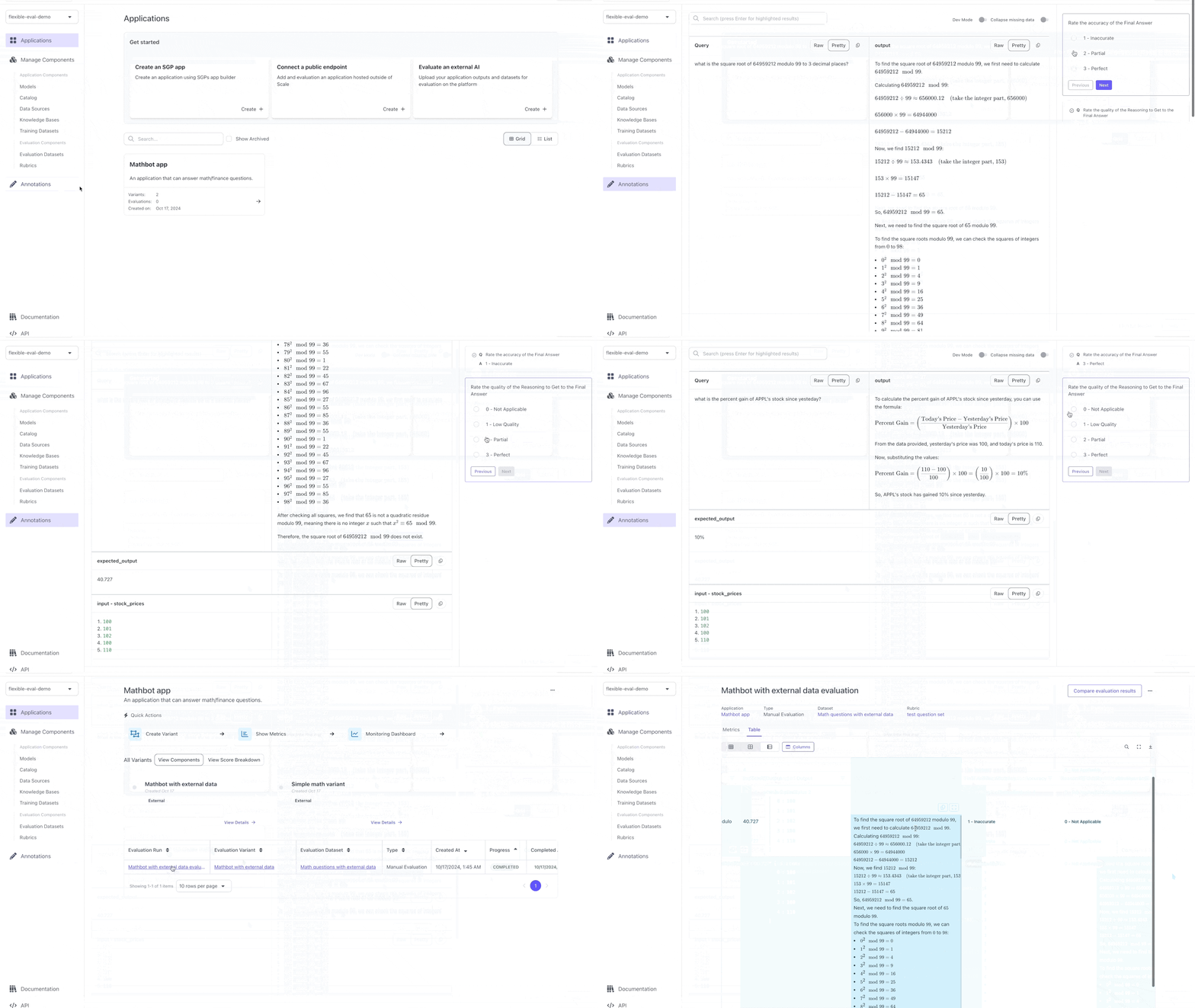
- Taking in more than just the user’s query (i.e., the stock prices from the last 5 days)
- Leveraging something that’s better than an LLM is at doing math.
4. V1: An application with multiple inputs
4. V1: An application with multiple inputs
First let’s create a Next, let’s update our application to take in the stock prices:Finally, let’s run our app again:
FLEXIBLE evaluation dataset with two inputs: query and stock_prices:from scale_gp.types.evaluation_datasets import FlexibleTestCaseSchema
flexible_eval_dataset = DatasetBuilder(client).initialize(
account_id=ACCOUNT_ID,
name="Math questions with external data",
test_cases = [
FlexibleTestCaseSchema(input={"stock_prices": [100, 101, 102, 100, 110], "query": "what is 2 plus 2"}, expected_output="4"),
FlexibleTestCaseSchema(input={"stock_prices": [100, 101, 102, 100, 110], "query": "what is the square root of 64959212 modulo 99 to 3 decimal places?"}, expected_output="40.727"),
FlexibleTestCaseSchema(input={"stock_prices": [100, 101, 102, 100, 110], "query": "what is the percent gain of APPL's stock since yesteday?"}, expected_output="10%"),
FlexibleTestCaseSchema(input={"stock_prices": [110, 101, 102, 100, 110], "query": "what is the percent gain of APPL's stock since 5 days ago?"}, expected_output="0%"),
]
)
import json
# Let's create a new app that can answer more complex questions and call
def mathbot_v1(input: dict):
system_prompt = f"Here are APPL's stock prices for the last 5 days (the last value is today's price):\n{json.dumps(input["stock_prices"], indent=2)}"
response = client.chat_completions.create(
messages=[
{
"role": "system",
"content": system_prompt
},
{
"role": "user",
"content": input["query"]
}
],
model="gpt-4o-mini",
)
print("Question:", input["query"], "Stock Prices:", input["stock_prices"], "Answer:", response.chat_completion.message.content)
return ExternalApplicationOutputCompletion(generation_output=response.chat_completion.message.content)
mathbot_with_external_data_variant = client.application_variants.create(
account_id=ACCOUNT_ID,
application_spec_id=math_app.id,
name="Mathbot with external data",
description="A variant that can answer math questions with external data.",
configuration={},
version="OFFLINE", # since we're running this variant locally, we set the version to OFFLINE
)
runner = ExternalApplication(
client,
).initialize(application_variant_id=mathbot_with_external_data_variant.id, application=mathbot_v1)
runner.generate_outputs(
evaluation_dataset_id=flexible_eval_dataset.id,
evaluation_dataset_version=1, # we only have 1 version of the dataset
)
5. Creating a custom annotation UI to evaluate V1
5. Creating a custom annotation UI to evaluate V1
To create a custom UI, let’s attach an annotation configuration to the evaluation. This configuration will specify how the test cases should be displayed to the evaluators.Let’s look at this evaluation:
annotation_config = {
"components": [
[
# Let's put the query and the output side by side since that's what we care about most
{ "data_loc": ["test_case_data", "input", "query"], "label": "Query" },
{ "data_loc": ["test_case_output", "output"] }
],
[
{ "data_loc": ["test_case_data", "expected_output"] }
],
[
{ "data_loc": ["test_case_data", "input", "stock_prices"] }
],
]
}
mathbot_with_external_data_evaluation = client.evaluations.create(
account_id=ACCOUNT_ID,
application_variant_id=mathbot_with_external_data_variant.id,
application_spec_id=math_app.id,
name="Mathbot with external data evaluation",
description="Mathbot with external data evaluation",
evaluation_config_id=evaluation_config.id,
type="builder",
evaluation_dataset_id=flexible_eval_dataset.id,
evaluation_dataset_version=1,
annotation_config=annotation_config
)
6. V2: A tool calling bot that generates a trace
6. V2: A tool calling bot that generates a trace
mathbot_with_python_variant = client.application_variants.create(
account_id=ACCOUNT_ID,
application_spec_id=math_app.id,
name="Mathbot with python",
description="A variant that can answer math questions with python.",
configuration={},
version="OFFLINE", # since we're running this variant locally, we set the version to OFFLINE
)
from datetime import datetime
import json
def mathbot_with_python(input: dict):
trace = []
# STEP 1: Generate a python script that can solve the problem
start = datetime.now()
system_prompt = f"Here are APPL's stock prices for the last 5 days (the last value is today's price): {json.dumps(input["stock_prices"])}"
response = client.chat_completions.create(
messages=[
{
"role": "system",
"content": system_prompt
},
{
"role": "user",
"content": input["query"]
},
{
"role": "user",
"content": "Return a python statement that can solve the problem, formatted as a markdown code block (WITHOUT the language specifier). Please make sure it is a python statement meaning it has no imports or assignments inside of it. It should not have any equals signs!"
}
],
model="gpt-4o-mini",
)
python_statement = response.chat_completion.message.content.split("```")[1].strip()
trace.append({
"node_id": "create_python_script",
"start_timestamp": start.isoformat(),
"operation_input": {
"stock_prices": input["stock_prices"],
"query": input["query"]
},
"operation_output": {
"python_script": python_statement
},
})
# STEP 2: Run the python script
start = datetime.now()
value = eval(python_statement)
trace.append({
"node_id": "run_python_script",
"start_timestamp": start.isoformat(),
"operation_input": {
"python_script": python_statement
},
"operation_output": {
"value": value
},
})
# STEP 3: Summarize the answer
start = datetime.now()
response = client.chat_completions.create(
messages=[
{
"role": "system",
"content": system_prompt
},
{
"role": "user",
"content": input["query"]
},
{
"role": "assistant",
"content": python_statement
},
{
"role": "user",
"content": f"This is the output of the script: {value}. What is the answer to the question?"
}
],
model="gpt-4o-mini",
)
trace.append({
"node_id": "summarize_output",
"start_timestamp": start.isoformat(),
"operation_input": {
"python_script": python_statement,
"value": value
},
"operation_output": {
"answer": response.chat_completion.message.content
},
})
print("Question:", input["query"], "Stock Prices:", input["stock_prices"], "Answer:", response.chat_completion.message.content)
return ExternalApplicationOutputCompletion(generation_output=response.chat_completion.message.content, trace_spans=trace)
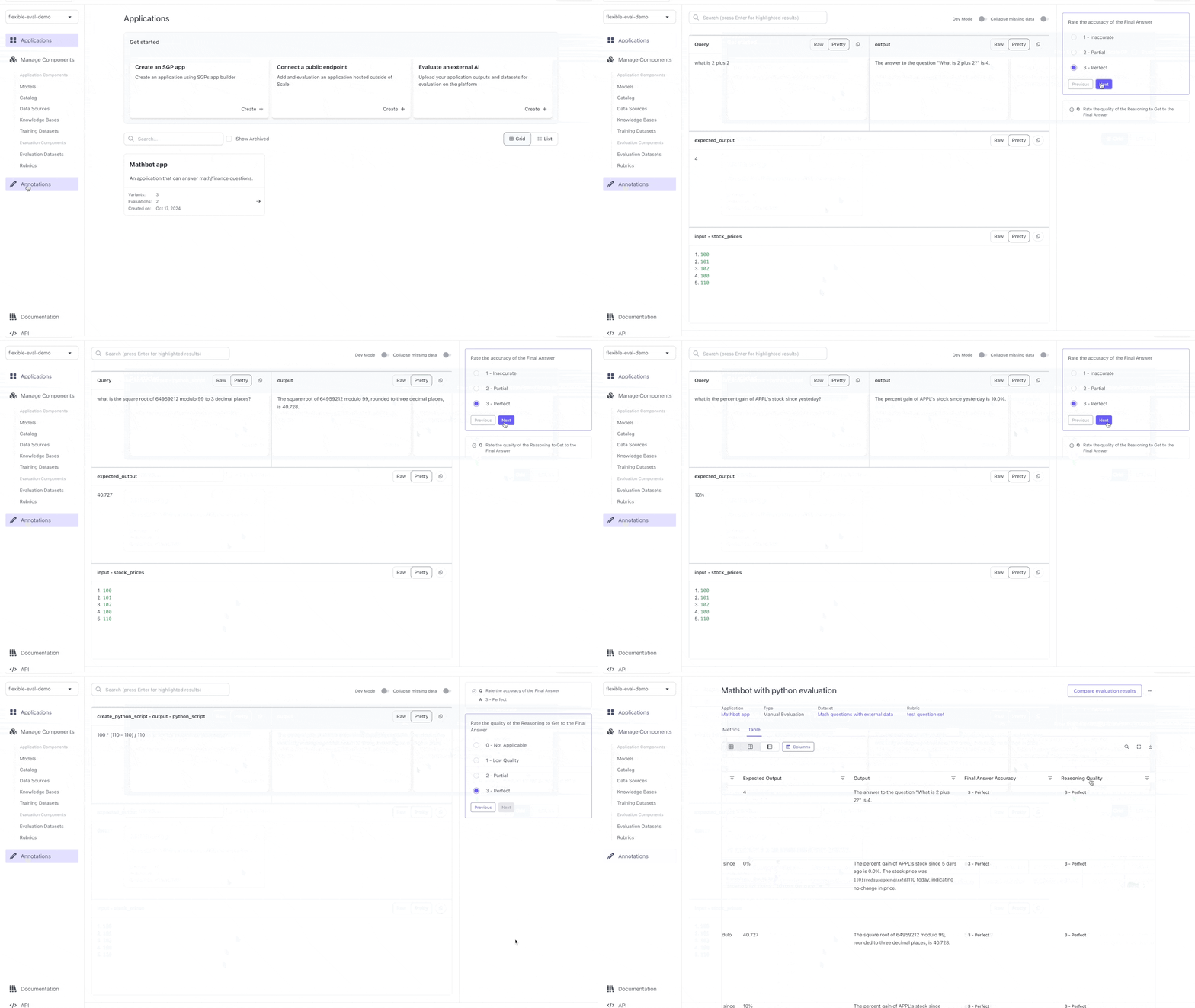
trace to the output. This will allow us to see what the bot did at each step.Let’s run this on the same dataset:runner = ExternalApplication(
client,
).initialize(application_variant_id=mathbot_with_python_variant.id, application=mathbot_with_python)
runner.generate_outputs(
evaluation_dataset_id=flexible_eval_dataset.id,
evaluation_dataset_version=1, # we only have 1 version of the dataset
)
7. Showing the trace to annotators and changing annotation configuration basd on question
7. Showing the trace to annotators and changing annotation configuration basd on question
mathbot_with_python_evaluation = client.evaluations.create(
account_id=ACCOUNT_ID,
application_variant_id=mathbot_with_python_variant.id,
application_spec_id=math_app.id,
name="Mathbot with python evaluation",
description="Mathbot with python evaluation",
evaluation_config_id=evaluation_config.id,
type="builder",
evaluation_dataset_id=flexible_eval_dataset.id,
evaluation_dataset_version=1,
annotation_config=annotation_config,
# For the second question, we only need to look at the python script to undertand the reasoning behind the answer
# So let's add a different annotation config for that question
question_id_to_annotation_config={
question_ids[1]: {
"components": [
[ { "data_loc": ["trace", "create_python_script", "output"] } ]
]
}
}
)
# 1. Instantiate Client
from scale_gp import SGPClient

ACCOUNT_ID = ... # fill in here
SGP_API_KEY = ...

client = SGPClient(
    api_key=SGP_API_KEY,
    account_id=ACCOUNT_ID,
)

# 2. Setup a Application and Evaluation Configuration
math_app = client.application_specs.create(
    account_id=ACCOUNT_ID,
    name="Mathbot",
    description="An application that can answer math/finance questions.",
)

question_requests = [
    {
        "type": "categorical",
        "title": "Final Answer Accuracy",
        "prompt": "Rate the accuracy of the Final Answer",
        "choices": [{"label": "1 - Inaccurate", "value": "1"}, {"label": "2 - Partial", "value": "2"}, {"label": "3 - Perfect", "value": "3"}],
        "account_id": ACCOUNT_ID,
    },
    {
        "type": "categorical",
        "title": "Reasoning Quality",
        "prompt": "Rate the quality of the Reasoning to Get to the Final Answer",
        "choices": [{"label": "0 - Not Applicable", "value": "0"}, {"label": "1 - Low Quality", "value": "1"}, {"label": "2 - Partial", "value": "2"}, {"label": "3 - Perfect", "value": "3"}],
        "account_id": ACCOUNT_ID,
    },
]

question_ids = []
for question in question_requests:
    q = client.questions.create(
        **question
    )
    question_ids.append(q.id)
    print(q)

q_set = client.question_sets.create(
    name="test question set",
    question_ids=question_ids,
    account_id=ACCOUNT_ID,
)

evaluation_config = client.evaluation_configs.create(
    account_id=ACCOUNT_ID,
    question_set_id=q_set.id,
    evaluation_type='human',
)

# 4. V1: An application with multiple inputs - Create a `FLEXIBLE` evaluation dataset
from scale_gp.types.evaluation_datasets import FlexibleTestCaseSchema
from scale_gp.lib.dataset_builder import DatasetBuilder

flexible_eval_dataset = DatasetBuilder(client).initialize(
    account_id=ACCOUNT_ID,
    name="Math questions with external data",
    test_cases = [
        FlexibleTestCaseSchema(input={"stock_prices": [100, 101, 102, 100, 110], "query": "what is 2 plus 2"}, expected_output="4"),
        FlexibleTestCaseSchema(input={"stock_prices": [100, 101, 102, 100, 110], "query": "what is the square root of 64959212 modulo 99 to 3 decimal places?"}, expected_output="40.727"),
        FlexibleTestCaseSchema(input={"stock_prices": [100, 101, 102, 100, 110], "query": "what is the percent gain of APPL's stock since yesteday?"}, expected_output="10%"),
        FlexibleTestCaseSchema(input={"stock_prices": [110, 101, 102, 100, 110], "query": "what is the percent gain of APPL's stock since 5 days ago?"}, expected_output="0%"),
    ]
)

# 6. V2: A tool calling bot that generates a trace
from scale_gp.lib.external_applications import ExternalApplication, ExternalApplicationOutputCompletion

mathbot_with_python_variant = client.application_variants.create(
    account_id=ACCOUNT_ID,
    application_spec_id=math_app.id,
    name="Mathbot with python",
    description="A variant that can answer math questions with python.",
    configuration={},
    version="OFFLINE", # since we're running this variant locally, we set the version to OFFLINE
)

from datetime import datetime

def mathbot_with_python(input: dict):
    trace = []

    # STEP 1: Generate a python script that can solve the problem
    start = datetime.now()
    system_prompt = f"Here are APPL's stock prices for the last 5 days (the last value is today's price): {json.dumps(input["stock_prices"])}"
    response = client.chat_completions.create(
        messages=[
            {
                "role": "system",
                "content": system_prompt
            },
            {
                "role": "user",
                "content": input["query"]
            },
            {
                "role": "user",
                "content": "Return a python statement that can solve the problem, formatted as a markdown code block (WITHOUT the language specifier). Please make sure it is a python statement meaning it has no imports or assignments inside of it. It should not have any equals signs!"
            }
        ],
        model="gpt-4o-mini",
    )
    python_statement = response.chat_completion.message.content.split("```")[1].strip()

    trace.append({
        "node_id": "create_python_script",
        "start_timestamp": start.isoformat(),
        "operation_input": {
            "stock_prices": input["stock_prices"],
            "query": input["query"]
        },
        "operation_output": {
            "python_script": python_statement
        },
    })

    # STEP 2: Run the python script
    start = datetime.now()
    value = eval(python_statement)

    trace.append({
        "node_id": "run_python_script",
        "start_timestamp": start.isoformat(),
        "operation_input": {
            "python_script": python_statement
        },
        "operation_output": {
            "value": value
        },
    })

    # STEP 3: Summarize the answer
    start = datetime.now()
    response = client.chat_completions.create(
        messages=[
            {
                "role": "system",
                "content": system_prompt
            },
            {
                "role": "user",
                "content": input["query"]
            },
            {
                "role": "assistant",
                "content": python_statement
            },
            {
                "role": "user",
                "content": f"This is the output of the script: {value}. What is the answer to the question?"
            }
        ],
        model="gpt-4o-mini",
    )

    trace.append({
        "node_id": "summarize_output",
        "start_timestamp": start.isoformat(),
        "operation_input": {
            "python_script": python_statement,
            "value": value
        },
        "operation_output": {
            "answer": response.chat_completion.message.content
        },
    })


    print("Question:", input["query"], "Stock Prices:", input["stock_prices"], "Answer:", response.chat_completion.message.content)

    return ExternalApplicationOutputCompletion(generation_output=response.chat_completion.message.content, trace_spans=trace)

runner = ExternalApplication(
    client,
).initialize(application_variant_id=mathbot_with_python_variant.id, application=mathbot_with_python)

runner.generate_outputs(
    evaluation_dataset_id=flexible_eval_dataset.id,
    evaluation_dataset_version=1, # we only have 1 version of the dataset
)

# 7. Showing the trace to annotators and changing annotation configuration basd on question
annotation_config = {
    "components": [
        [
            # Let's put the query and the output side by side since that's what we care about most
            { "data_loc": ["test_case_data", "input", "query"], "label": "Query" },
            { "data_loc": ["test_case_output", "output"] }
        ],
        [
            { "data_loc": ["test_case_data", "expected_output"] }
        ],
        [
            { "data_loc": ["test_case_data", "input", "stock_prices"] }
        ],
    ]
}

mathbot_with_python_evaluation = client.evaluations.create(
    account_id=ACCOUNT_ID,
    application_variant_id=mathbot_with_python_variant.id,
    application_spec_id=math_app.id,
    name="Mathbot with python evaluation",
    description="Mathbot with python evaluation",
    evaluation_config_id=evaluation_config.id,
    type="builder",
    evaluation_dataset_id=flexible_eval_dataset.id,
    evaluation_dataset_version=1,
    annotation_config=annotation_config,
    # For the second question, we only need to look at the python script to undertand the reasoning behind the answer
    # So let's add a different annotation config for that question
    question_id_to_annotation_config={
        question_ids[1]: {
            "components": [
                [ { "data_loc": ["trace", "create_python_script", "output"] } ]
            ]
        }
    }
)