> ## Documentation Index
> Fetch the complete documentation index at: https://docs.gp.scale.com/llms.txt
> Use this file to discover all available pages before exploring further.
# Table Widget
> Display multi-dimensional data in rows and columns with grouping and sorting
**Using Sample Data**: The examples on this page use fields from our sample dataset. Download it and create an evaluation with it to follow along with this tutorial.
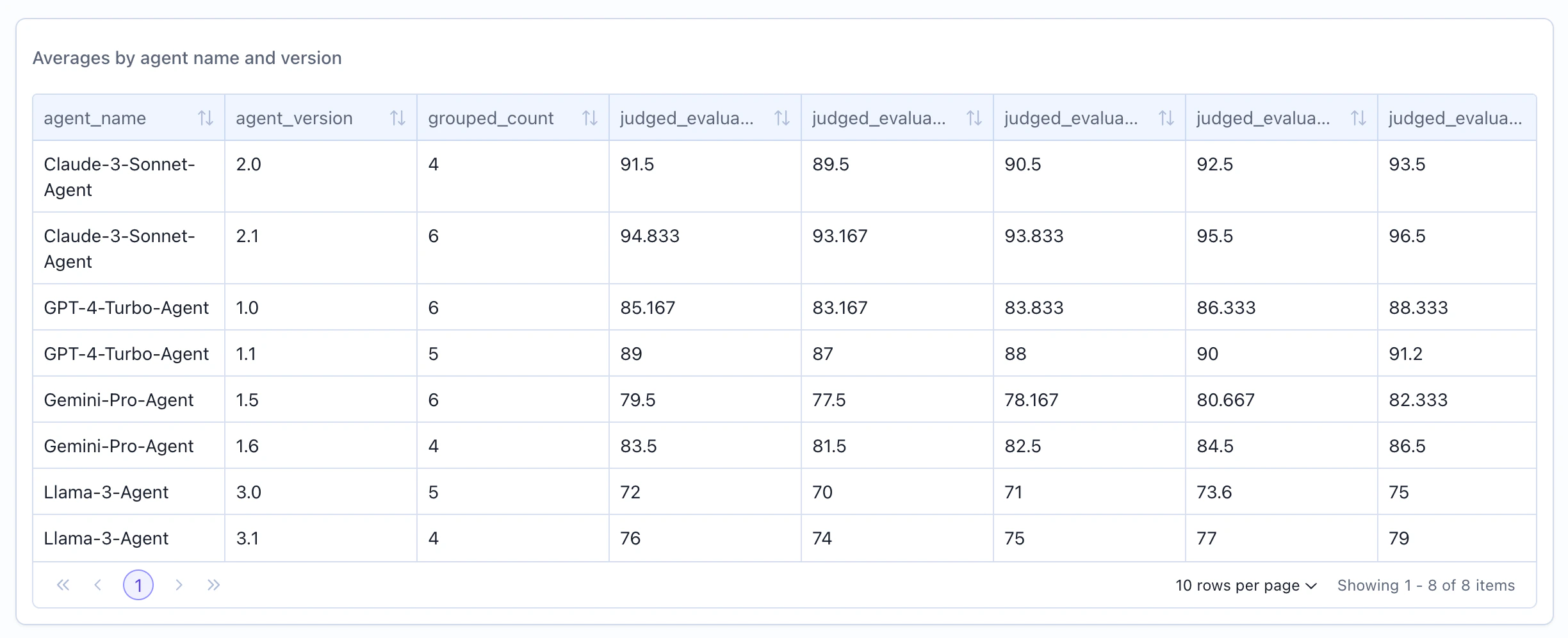 ## When to Use
Use table widgets to:
* Show detailed breakdowns by multiple dimensions
* Display ranked lists (top/bottom performers)
* Present multi-column statistical summaries
* Create export-friendly data views
* Compare metrics across categories
* Show individual item details
## Configuration
### Required Fields
Widget display name shown on the dashboard
Must be set to "table"
SeriesQuery returning multiple rows
### Query Requirements
Table widgets require a **SeriesQuery** with:
* At least one item in the `select` clause
* Can mix `COLUMN` and `AGGREGATION` expressions
* Supports `filter` for row filtering
* Supports `groupBy` for dimensional breakdowns
* Supports `limit` for top-N results
When using `groupBy`, all non-aggregated columns in `select` must appear in the `groupBy` array.
## Creating in the UI
From your dashboard, click "Add Widget" and select "Table"
Decide whether to group by columns or not by toggling the "Group By" toggle. If you turn off grouping, you will not be able to aggregate data.
When grouping is turned on, we will automatically output the count of the group.
If aggregating, specify which columns to group by, if not grouping select the columns you want to display.
Give your table a descriptive name (e.g., "Average Scores by Agent")
## When to Use
Use table widgets to:
* Show detailed breakdowns by multiple dimensions
* Display ranked lists (top/bottom performers)
* Present multi-column statistical summaries
* Create export-friendly data views
* Compare metrics across categories
* Show individual item details
## Configuration
### Required Fields
Widget display name shown on the dashboard
Must be set to "table"
SeriesQuery returning multiple rows
### Query Requirements
Table widgets require a **SeriesQuery** with:
* At least one item in the `select` clause
* Can mix `COLUMN` and `AGGREGATION` expressions
* Supports `filter` for row filtering
* Supports `groupBy` for dimensional breakdowns
* Supports `limit` for top-N results
When using `groupBy`, all non-aggregated columns in `select` must appear in the `groupBy` array.
## Creating in the UI
From your dashboard, click "Add Widget" and select "Table"
Decide whether to group by columns or not by toggling the "Group By" toggle. If you turn off grouping, you will not be able to aggregate data.
When grouping is turned on, we will automatically output the count of the group.
If aggregating, specify which columns to group by, if not grouping select the columns you want to display.
Give your table a descriptive name (e.g., "Average Scores by Agent")
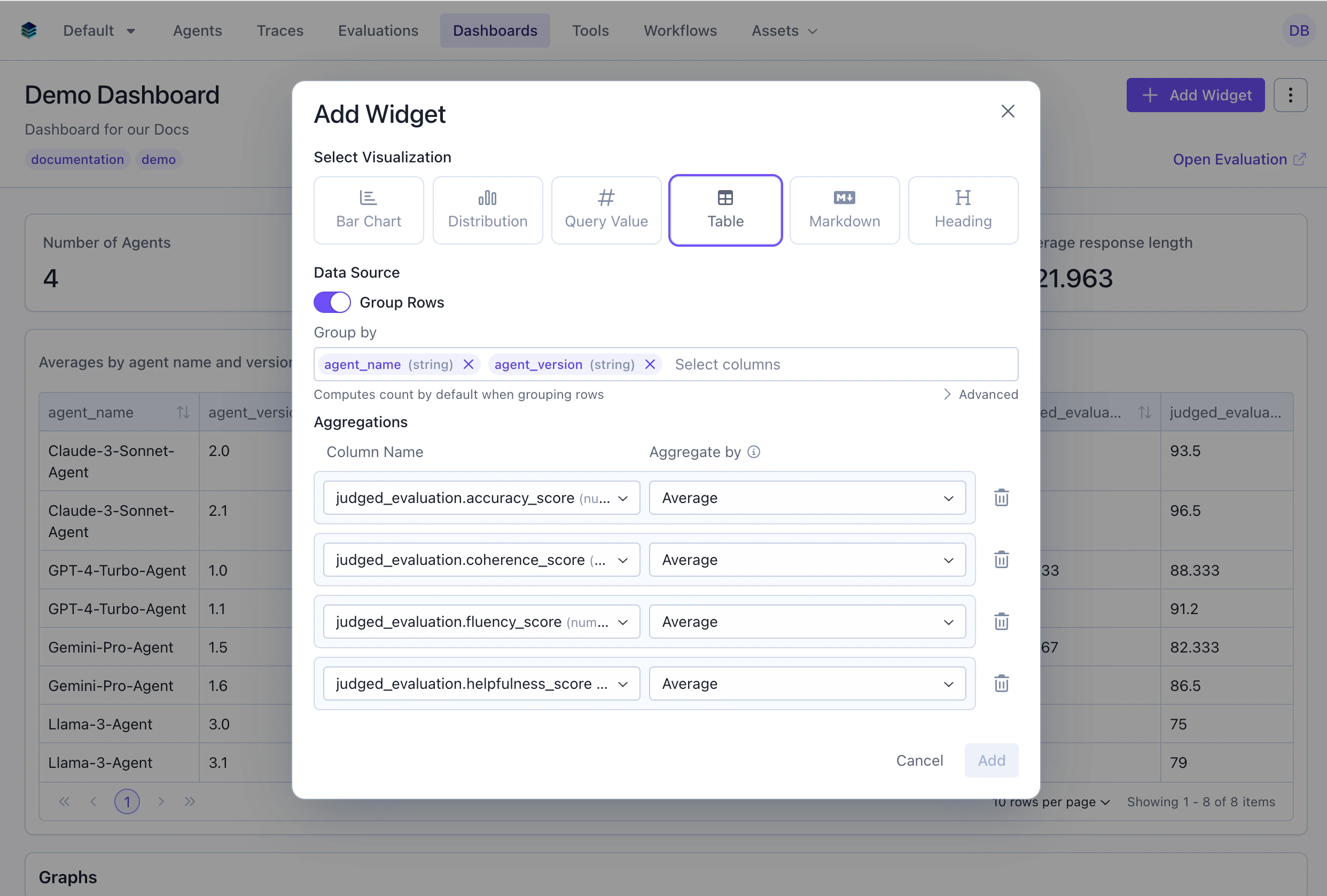 Add metrics to display:
* **Columns**: Select fields from your data
* **Aggregations**: Add computed metrics (AVG, COUNT, etc.)
Add metrics to display:
* **Columns**: Select fields from your data
* **Aggregations**: Add computed metrics (AVG, COUNT, etc.)
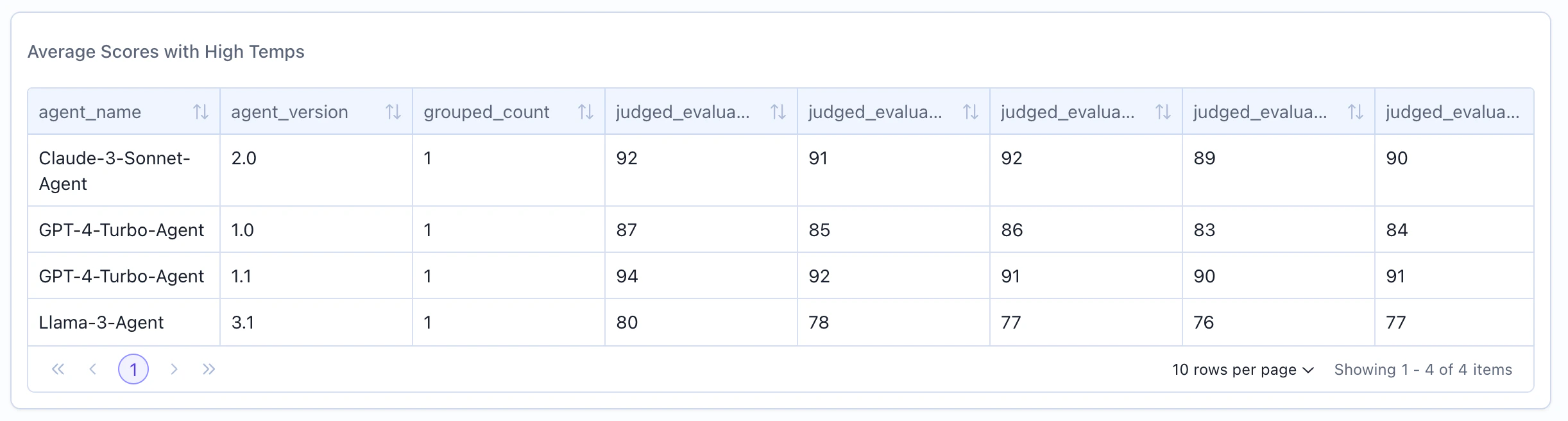
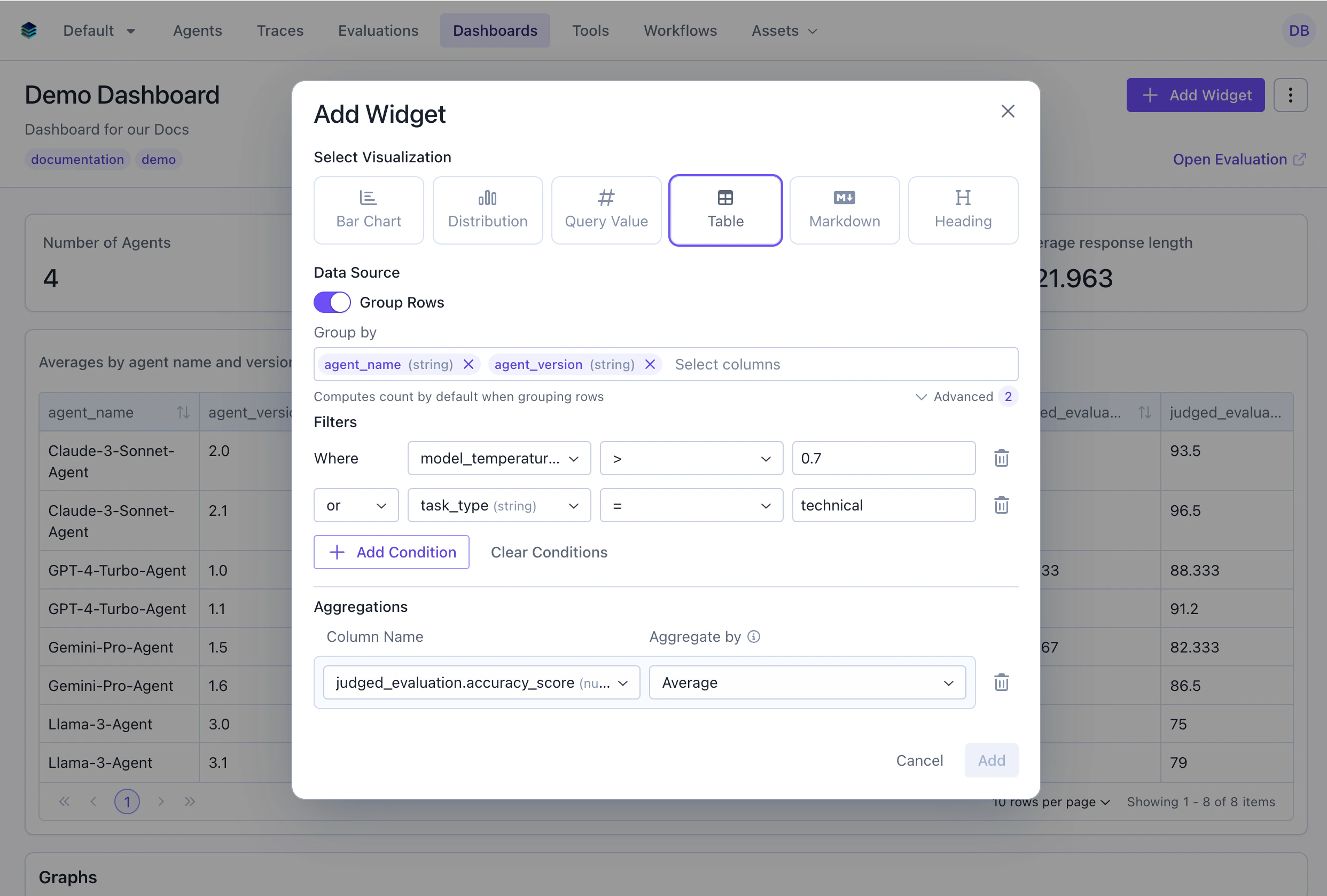 Add conditions to narrow the data, these conditions will be applied to the data before it is aggregated.
Click "Add" to display the table
Add conditions to narrow the data, these conditions will be applied to the data before it is aggregated.
Click "Add" to display the table
 ## Conditional Formatting
Apply color-coded formatting rules to table cells to highlight important values at a glance. Conditional formatting is available on grouped tables (tables with aggregations).
## Conditional Formatting
Apply color-coded formatting rules to table cells to highlight important values at a glance. Conditional formatting is available on grouped tables (tables with aggregations).
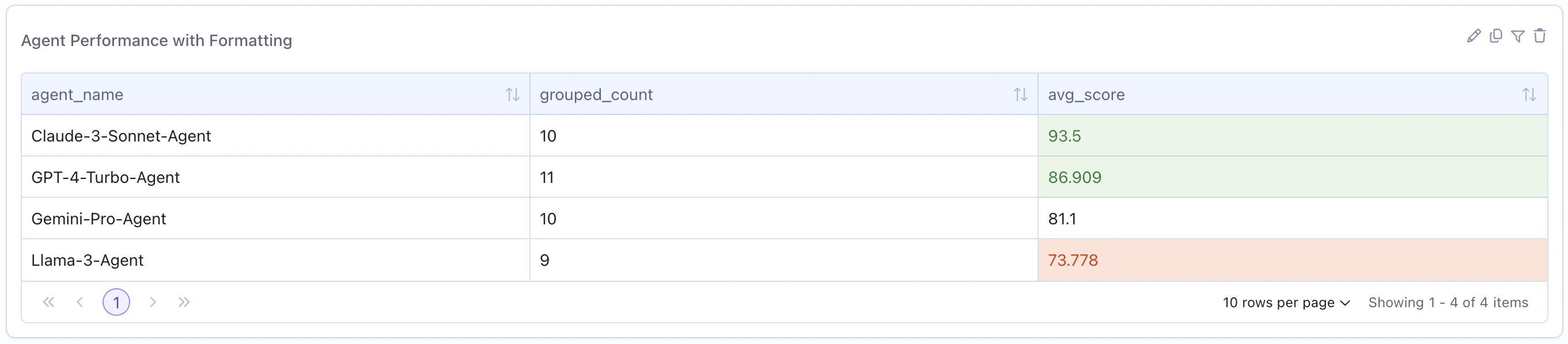 ### Enabling in the UI
When creating or editing a grouped table widget, expand the "Formatting" section to add rules. Select the aggregation column to format, choose a rule type, and pick a color.
### Enabling in the UI
When creating or editing a grouped table widget, expand the "Formatting" section to add rules. Select the aggregation column to format, choose a rule type, and pick a color.
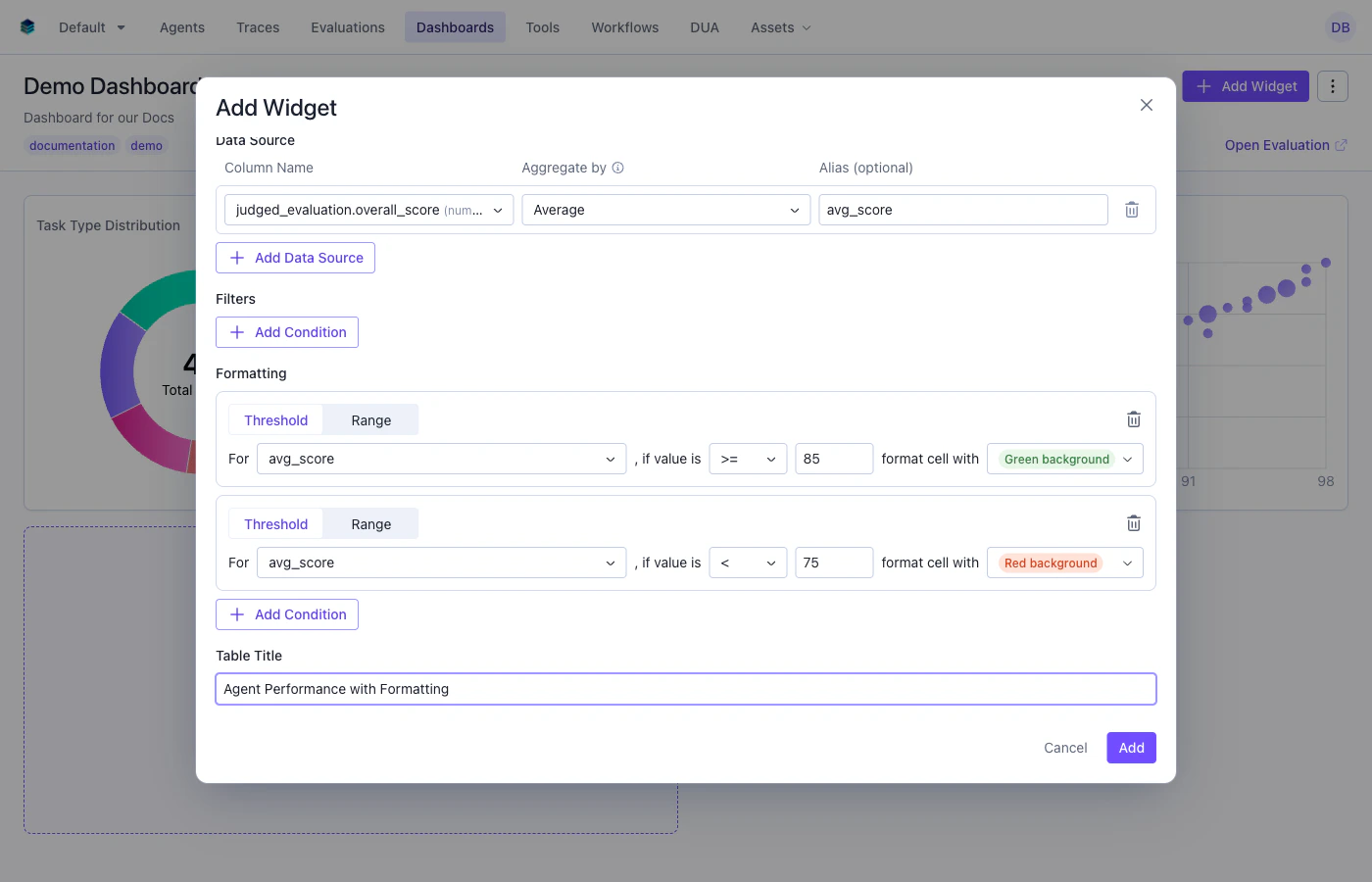 ### Rule Types
#### Threshold Rules
Apply formatting when a cell value meets a comparison condition.
| Field | Type | Description |
| ------------------ | ------ | -------------------------------------------------- |
| `type` | string | Must be `"threshold"` |
| `column` | string | Aggregation column name to format |
| `operator` | string | One of: `=`, `>`, `<`, `>=`, `<=` |
| `threshold` | number | Value to compare against |
| `background_color` | string | One of: `green`, `yellow`, `red`, `purple`, `blue` |
#### Range Rules
Apply formatting when a cell value falls within a range (inclusive).
| Field | Type | Description |
| ------------------ | ------ | -------------------------------------------------- |
| `type` | string | Must be `"range"` |
| `column` | string | Aggregation column name to format |
| `min_threshold` | number | Lower bound (inclusive) |
| `max_threshold` | number | Upper bound (inclusive) |
| `background_color` | string | One of: `green`, `yellow`, `red`, `purple`, `blue` |
### SDK Example
```python Python theme={null}
widget = client.evaluation_dashboards.widgets.create(
dashboard_id=dashboard.id,
title="Agent Scores with Formatting",
type="table",
query={
"select": [
{"expression": {"type": "COLUMN", "column": "agent_name", "source": "data"}},
{
"expression": {
"type": "AGGREGATION",
"function": "AVG",
"column": "overall_score",
"source": "data"
},
"alias": "avg_score"
}
],
"groupBy": ["agent_name"]
},
config={
"conditional_formatting": [
{
"type": "threshold",
"column": "avg_score",
"operator": ">=",
"threshold": 90,
"background_color": "green"
},
{
"type": "range",
"column": "avg_score",
"min_threshold": 70,
"max_threshold": 89,
"background_color": "yellow"
},
{
"type": "threshold",
"column": "avg_score",
"operator": "<",
"threshold": 70,
"background_color": "red"
}
]
}
)
```
```json JSON theme={null}
{
"title": "Agent Scores with Formatting",
"type": "table",
"query": {
"select": [
{"expression": {"type": "COLUMN", "column": "agent_name", "source": "data"}},
{
"expression": {"type": "AGGREGATION", "function": "AVG", "column": "overall_score", "source": "data"},
"alias": "avg_score"
}
],
"groupBy": ["agent_name"]
},
"config": {
"conditional_formatting": [
{
"type": "threshold",
"column": "avg_score",
"operator": ">=",
"threshold": 90,
"background_color": "green"
},
{
"type": "range",
"column": "avg_score",
"min_threshold": 70,
"max_threshold": 89,
"background_color": "yellow"
},
{
"type": "threshold",
"column": "avg_score",
"operator": "<",
"threshold": 70,
"background_color": "red"
}
]
}
}
```
### Formatting Behavior
* Rules are evaluated in order -- the **first matching rule wins**
* Only applies to aggregation columns in grouped tables
* Available colors: `green`, `yellow`, `red`, `purple`, `blue`
* For percentage columns, formatting comparisons use the display value (0-100), not the raw decimal (0-1)
## Output Format
Table widgets return an array of row objects:
```json theme={null}
{
"type": "series",
"data": [
{"category": "Quality", "count": 342, "avg_score": 0.89},
{"category": "Accuracy", "count": 298, "avg_score": 0.85},
{"category": "Helpfulness", "count": 411, "avg_score": 0.91}
]
}
```
Each object in the `data` array represents one row, with keys corresponding to column names.
## Example Use Cases
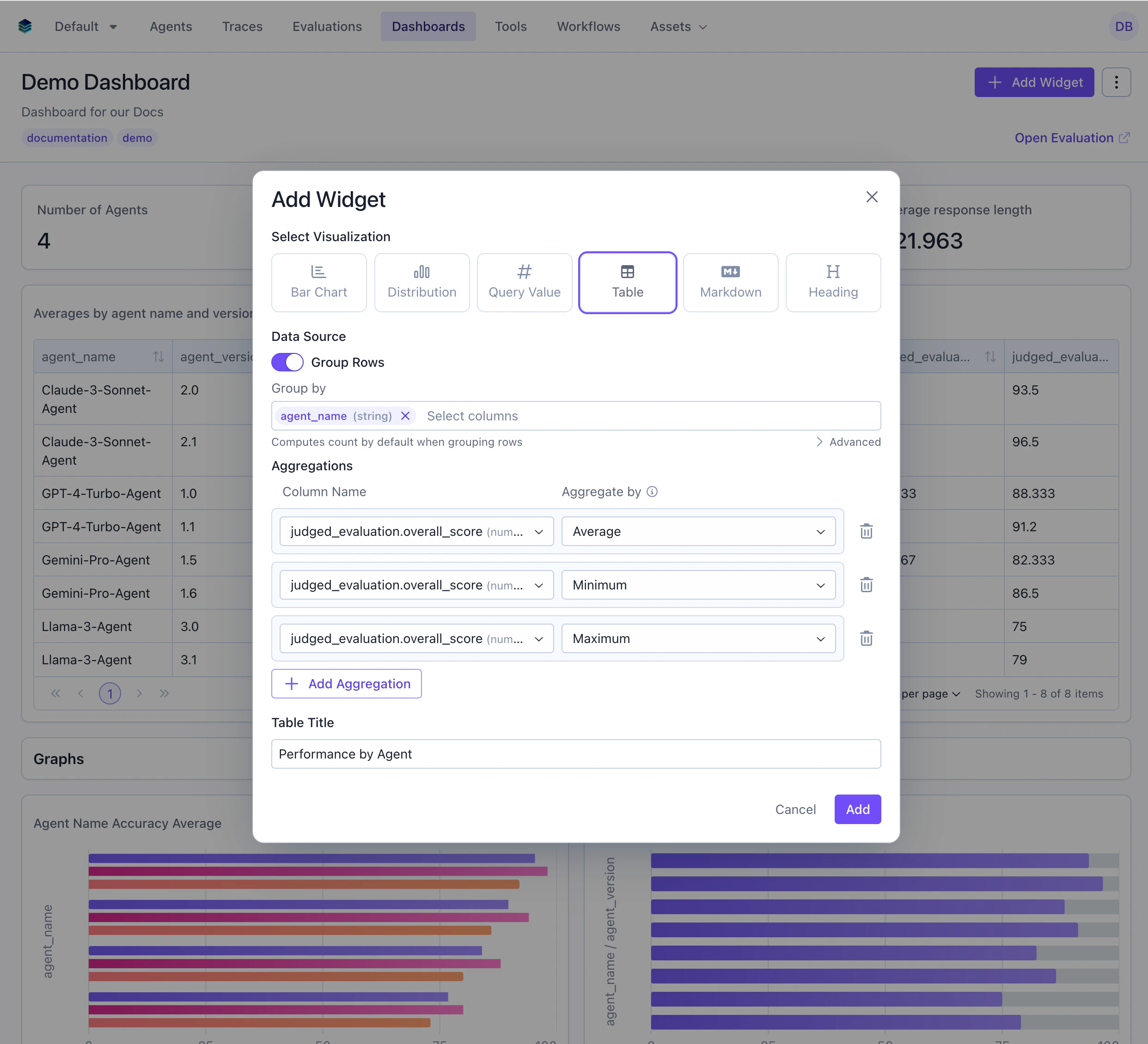
### Use Case 1: Agent Performance Breakdown
Show statistics grouped by agent with multiple metrics.
### Rule Types
#### Threshold Rules
Apply formatting when a cell value meets a comparison condition.
| Field | Type | Description |
| ------------------ | ------ | -------------------------------------------------- |
| `type` | string | Must be `"threshold"` |
| `column` | string | Aggregation column name to format |
| `operator` | string | One of: `=`, `>`, `<`, `>=`, `<=` |
| `threshold` | number | Value to compare against |
| `background_color` | string | One of: `green`, `yellow`, `red`, `purple`, `blue` |
#### Range Rules
Apply formatting when a cell value falls within a range (inclusive).
| Field | Type | Description |
| ------------------ | ------ | -------------------------------------------------- |
| `type` | string | Must be `"range"` |
| `column` | string | Aggregation column name to format |
| `min_threshold` | number | Lower bound (inclusive) |
| `max_threshold` | number | Upper bound (inclusive) |
| `background_color` | string | One of: `green`, `yellow`, `red`, `purple`, `blue` |
### SDK Example
```python Python theme={null}
widget = client.evaluation_dashboards.widgets.create(
dashboard_id=dashboard.id,
title="Agent Scores with Formatting",
type="table",
query={
"select": [
{"expression": {"type": "COLUMN", "column": "agent_name", "source": "data"}},
{
"expression": {
"type": "AGGREGATION",
"function": "AVG",
"column": "overall_score",
"source": "data"
},
"alias": "avg_score"
}
],
"groupBy": ["agent_name"]
},
config={
"conditional_formatting": [
{
"type": "threshold",
"column": "avg_score",
"operator": ">=",
"threshold": 90,
"background_color": "green"
},
{
"type": "range",
"column": "avg_score",
"min_threshold": 70,
"max_threshold": 89,
"background_color": "yellow"
},
{
"type": "threshold",
"column": "avg_score",
"operator": "<",
"threshold": 70,
"background_color": "red"
}
]
}
)
```
```json JSON theme={null}
{
"title": "Agent Scores with Formatting",
"type": "table",
"query": {
"select": [
{"expression": {"type": "COLUMN", "column": "agent_name", "source": "data"}},
{
"expression": {"type": "AGGREGATION", "function": "AVG", "column": "overall_score", "source": "data"},
"alias": "avg_score"
}
],
"groupBy": ["agent_name"]
},
"config": {
"conditional_formatting": [
{
"type": "threshold",
"column": "avg_score",
"operator": ">=",
"threshold": 90,
"background_color": "green"
},
{
"type": "range",
"column": "avg_score",
"min_threshold": 70,
"max_threshold": 89,
"background_color": "yellow"
},
{
"type": "threshold",
"column": "avg_score",
"operator": "<",
"threshold": 70,
"background_color": "red"
}
]
}
}
```
### Formatting Behavior
* Rules are evaluated in order -- the **first matching rule wins**
* Only applies to aggregation columns in grouped tables
* Available colors: `green`, `yellow`, `red`, `purple`, `blue`
* For percentage columns, formatting comparisons use the display value (0-100), not the raw decimal (0-1)
## Output Format
Table widgets return an array of row objects:
```json theme={null}
{
"type": "series",
"data": [
{"category": "Quality", "count": 342, "avg_score": 0.89},
{"category": "Accuracy", "count": 298, "avg_score": 0.85},
{"category": "Helpfulness", "count": 411, "avg_score": 0.91}
]
}
```
Each object in the `data` array represents one row, with keys corresponding to column names.
## Example Use Cases
### Use Case 1: Agent Performance Breakdown
Show statistics grouped by agent with multiple metrics.
 ```python Python theme={null}
widget = client.evaluation_dashboards.widgets.create(
dashboard_id=dashboard.id,
title="Performance by Agent",
type="table",
query={
"select": [
{
"expression": {
"type": "COLUMN",
"column": "agent_name",
"source": "data"
}
},
{
"expression": {
"type": "AGGREGATION",
"function": "COUNT",
"column": "*"
}
},
{
"expression": {
"type": "AGGREGATION",
"function": "AVG",
"column": "overall_score",
"source": "data"
}
},
{
"expression": {
"type": "AGGREGATION",
"function": "MIN",
"column": "overall_score",
"source": "data"
}
},
{
"expression": {
"type": "AGGREGATION",
"function": "MAX",
"column": "overall_score",
"source": "data"
}
}
],
"groupBy": ["agent_name"],
}
)
```
```json JSON theme={null}
{
"title": "Performance by Agent",
"type": "table",
"query": {
"select": [
{"expression": {"type": "COLUMN", "column": "agent_name", "source": "data"}},
{"expression": {"type": "AGGREGATION", "function": "COUNT", "column": "*"}},
{"expression": {"type": "AGGREGATION", "function": "AVG", "column": "overall_score", "source": "data"}},
{"expression": {"type": "AGGREGATION", "function": "MIN", "column": "overall_score", "source": "data"}},
{"expression": {"type": "AGGREGATION", "function": "MAX", "column": "overall_score", "source": "data"}}
],
"groupBy": ["agent_name"]
}
}
```
***
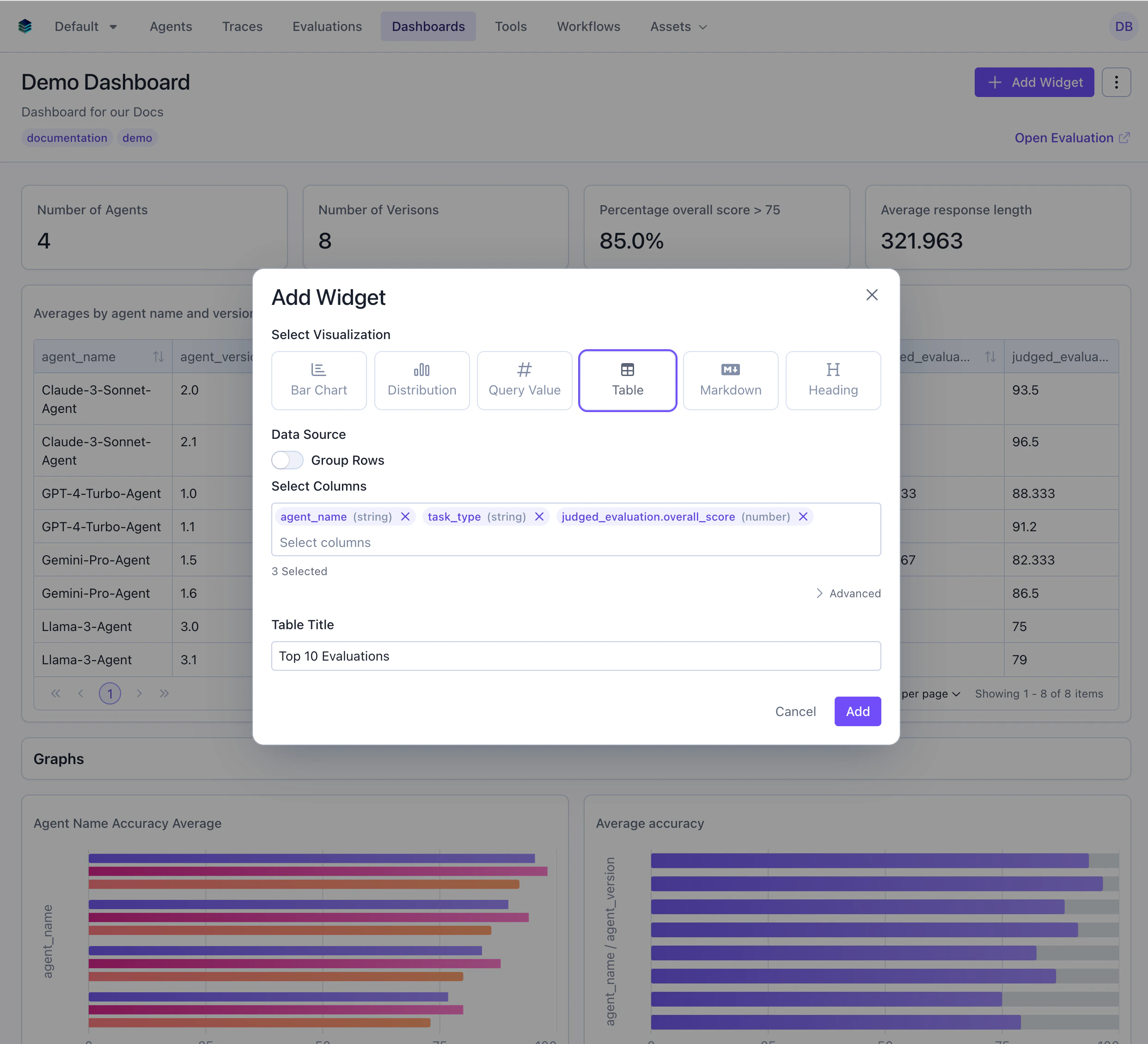
### Use Case 2: Top 10 Highest-Scoring Evaluations
Display the best-performing individual evaluations without aggregation.
In the UI sort using the table header, this will not be reflected in the query.
```python Python theme={null}
widget = client.evaluation_dashboards.widgets.create(
dashboard_id=dashboard.id,
title="Performance by Agent",
type="table",
query={
"select": [
{
"expression": {
"type": "COLUMN",
"column": "agent_name",
"source": "data"
}
},
{
"expression": {
"type": "AGGREGATION",
"function": "COUNT",
"column": "*"
}
},
{
"expression": {
"type": "AGGREGATION",
"function": "AVG",
"column": "overall_score",
"source": "data"
}
},
{
"expression": {
"type": "AGGREGATION",
"function": "MIN",
"column": "overall_score",
"source": "data"
}
},
{
"expression": {
"type": "AGGREGATION",
"function": "MAX",
"column": "overall_score",
"source": "data"
}
}
],
"groupBy": ["agent_name"],
}
)
```
```json JSON theme={null}
{
"title": "Performance by Agent",
"type": "table",
"query": {
"select": [
{"expression": {"type": "COLUMN", "column": "agent_name", "source": "data"}},
{"expression": {"type": "AGGREGATION", "function": "COUNT", "column": "*"}},
{"expression": {"type": "AGGREGATION", "function": "AVG", "column": "overall_score", "source": "data"}},
{"expression": {"type": "AGGREGATION", "function": "MIN", "column": "overall_score", "source": "data"}},
{"expression": {"type": "AGGREGATION", "function": "MAX", "column": "overall_score", "source": "data"}}
],
"groupBy": ["agent_name"]
}
}
```
***
### Use Case 2: Top 10 Highest-Scoring Evaluations
Display the best-performing individual evaluations without aggregation.
In the UI sort using the table header, this will not be reflected in the query.
 ```python Python theme={null}
widget = client.evaluation_dashboards.widgets.create(
dashboard_id=dashboard.id,
title="Top 10 Evaluations",
type="table",
query={
"select": [
{
"expression": {
"type": "COLUMN",
"column": "agent_name",
"source": "data"
}
},
{
"expression": {
"type": "COLUMN",
"column": "task_type",
"source": "data"
}
},
{
"expression": {
"type": "COLUMN",
"column": "overall_score",
"source": "data"
}
}
],
"orderBy": [
{
"column": "overall_score",
"direction": "DESC"
}
],
"limit": 10
}
)
```
```json JSON theme={null}
{
"title": "Top 10 Evaluations",
"type": "table",
"query": {
"select": [
{"expression": {"type": "COLUMN", "column": "agent_name", "source": "data"}},
{"expression": {"type": "COLUMN", "column": "task_type", "source": "data"}},
{"expression": {"type": "COLUMN", "column": "overall_score", "source": "data"}}
],
"orderBy": [{"column": "overall_score", "direction": "DESC"}],
"limit": 10
}
}
```
***
### Use Case 3: Agent Comparison with Multiple Metrics
Compare agents across several statistical measures including accuracy and relevance.
```python Python theme={null}
widget = client.evaluation_dashboards.widgets.create(
dashboard_id=dashboard.id,
title="Top 10 Evaluations",
type="table",
query={
"select": [
{
"expression": {
"type": "COLUMN",
"column": "agent_name",
"source": "data"
}
},
{
"expression": {
"type": "COLUMN",
"column": "task_type",
"source": "data"
}
},
{
"expression": {
"type": "COLUMN",
"column": "overall_score",
"source": "data"
}
}
],
"orderBy": [
{
"column": "overall_score",
"direction": "DESC"
}
],
"limit": 10
}
)
```
```json JSON theme={null}
{
"title": "Top 10 Evaluations",
"type": "table",
"query": {
"select": [
{"expression": {"type": "COLUMN", "column": "agent_name", "source": "data"}},
{"expression": {"type": "COLUMN", "column": "task_type", "source": "data"}},
{"expression": {"type": "COLUMN", "column": "overall_score", "source": "data"}}
],
"orderBy": [{"column": "overall_score", "direction": "DESC"}],
"limit": 10
}
}
```
***
### Use Case 3: Agent Comparison with Multiple Metrics
Compare agents across several statistical measures including accuracy and relevance.
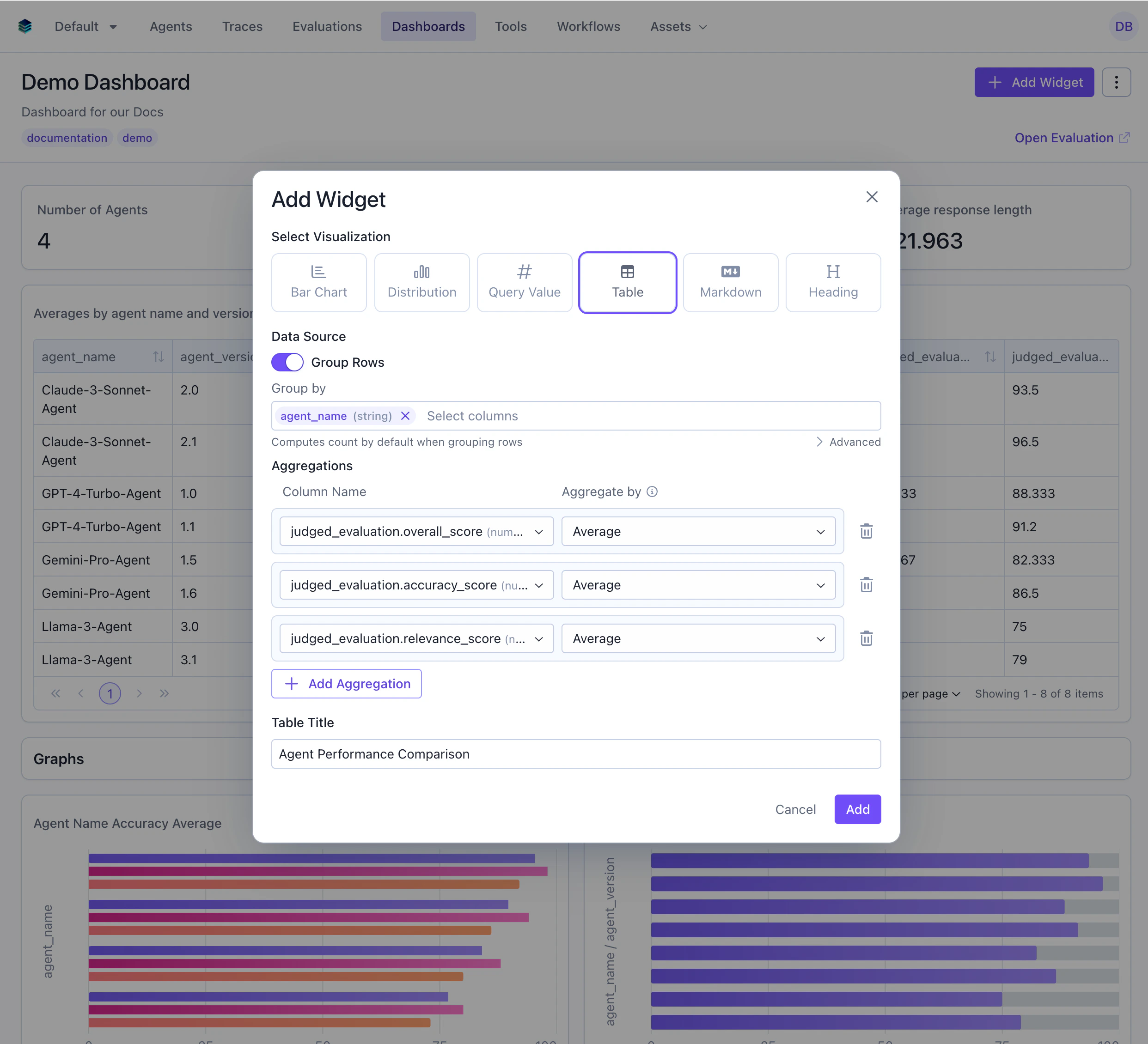 ```python Python theme={null}
widget = client.evaluation_dashboards.widgets.create(
dashboard_id=dashboard.id,
title="Agent Performance Comparison",
type="table",
query={
"select": [
{
"expression": {
"type": "COLUMN",
"column": "agent_name",
"source": "data"
}
},
{
"expression": {
"type": "AGGREGATION",
"function": "COUNT",
"column": "*"
}
},
{
"expression": {
"type": "AGGREGATION",
"function": "AVG",
"column": "overall_score",
"source": "data"
}
},
{
"expression": {
"type": "AGGREGATION",
"function": "AVG",
"column": "accuracy_score",
"source": "data"
}
},
{
"expression": {
"type": "AGGREGATION",
"function": "AVG",
"column": "relevance_score",
"source": "data"
}
}
],
"groupBy": ["agent_name"]
}
)
```
```json JSON theme={null}
{
"title": "Agent Performance Comparison",
"type": "table",
"query": {
"select": [
{"expression": {"type": "COLUMN", "column": "agent_name", "source": "data"}},
{"expression": {"type": "AGGREGATION", "function": "COUNT", "column": "*"}},
{"expression": {"type": "AGGREGATION", "function": "AVG", "column": "overall_score", "source": "data"}},
{"expression": {"type": "AGGREGATION", "function": "AVG", "column": "accuracy_score", "source": "data"}},
{"expression": {"type": "AGGREGATION", "function": "AVG", "column": "relevance_score", "source": "data"}}
],
"groupBy": ["agent_name"]
}
}
```
***
### Use Case 4: Low-Scoring Evaluations Review
Show evaluations scoring below 80 that need attention.
```python Python theme={null}
widget = client.evaluation_dashboards.widgets.create(
dashboard_id=dashboard.id,
title="Agent Performance Comparison",
type="table",
query={
"select": [
{
"expression": {
"type": "COLUMN",
"column": "agent_name",
"source": "data"
}
},
{
"expression": {
"type": "AGGREGATION",
"function": "COUNT",
"column": "*"
}
},
{
"expression": {
"type": "AGGREGATION",
"function": "AVG",
"column": "overall_score",
"source": "data"
}
},
{
"expression": {
"type": "AGGREGATION",
"function": "AVG",
"column": "accuracy_score",
"source": "data"
}
},
{
"expression": {
"type": "AGGREGATION",
"function": "AVG",
"column": "relevance_score",
"source": "data"
}
}
],
"groupBy": ["agent_name"]
}
)
```
```json JSON theme={null}
{
"title": "Agent Performance Comparison",
"type": "table",
"query": {
"select": [
{"expression": {"type": "COLUMN", "column": "agent_name", "source": "data"}},
{"expression": {"type": "AGGREGATION", "function": "COUNT", "column": "*"}},
{"expression": {"type": "AGGREGATION", "function": "AVG", "column": "overall_score", "source": "data"}},
{"expression": {"type": "AGGREGATION", "function": "AVG", "column": "accuracy_score", "source": "data"}},
{"expression": {"type": "AGGREGATION", "function": "AVG", "column": "relevance_score", "source": "data"}}
],
"groupBy": ["agent_name"]
}
}
```
***
### Use Case 4: Low-Scoring Evaluations Review
Show evaluations scoring below 80 that need attention.
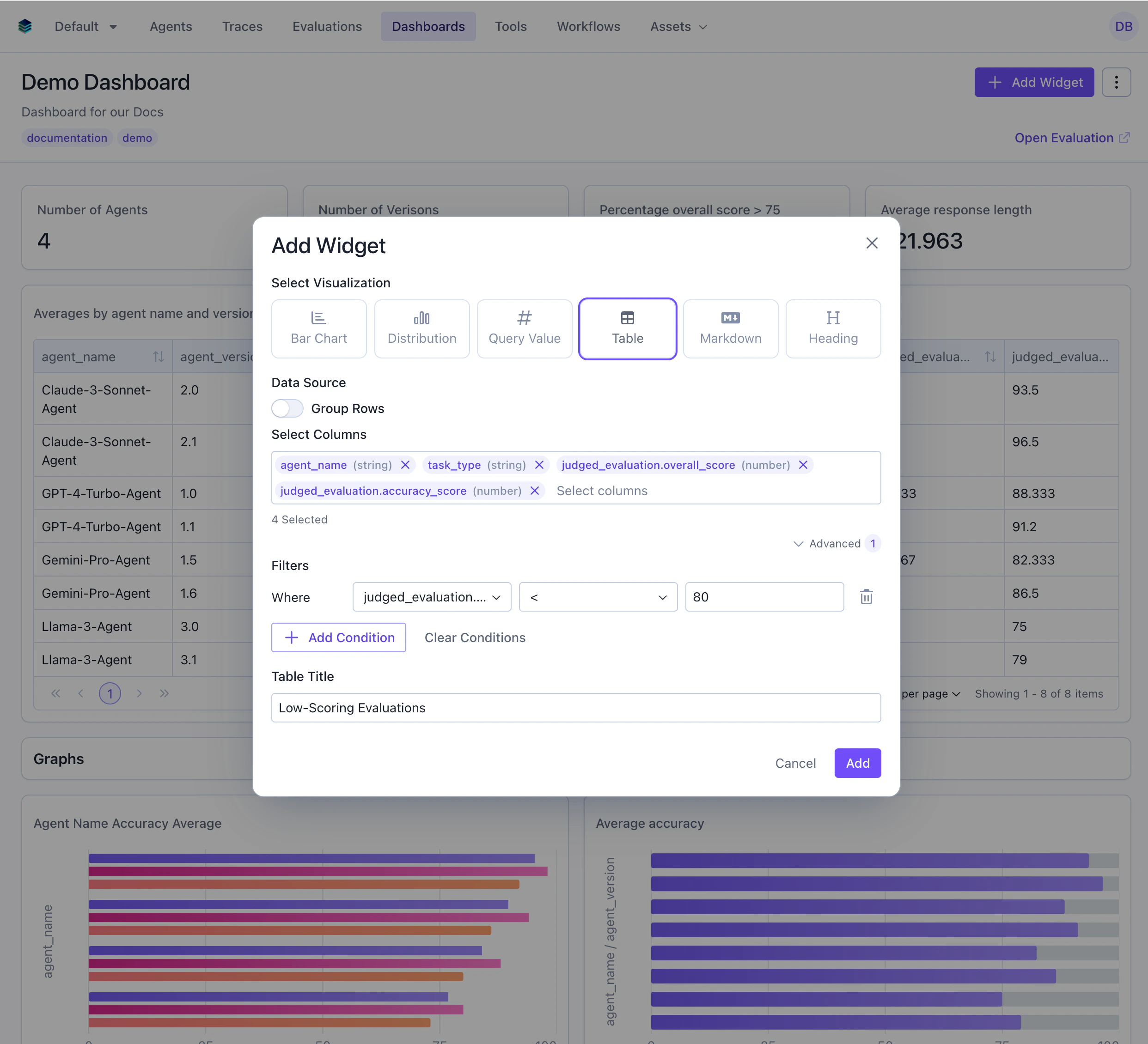 ```python Python theme={null}
widget = client.evaluation_dashboards.widgets.create(
dashboard_id=dashboard.id,
title="Low-Scoring Evaluations",
type="table",
query={
"select": [
{"expression": {"type": "COLUMN", "column": "agent_name", "source": "data"}},
{"expression": {"type": "COLUMN", "column": "task_type", "source": "data"}},
{"expression": {"type": "COLUMN", "column": "overall_score", "source": "data"}},
{"expression": {"type": "COLUMN", "column": "accuracy_score", "source": "data"}}
],
"filter": {
"conditions": [
{
"column": "overall_score",
"source": "data",
"operator": "<",
"value": 80
}
]
}
}
)
```
```json JSON theme={null}
{
"title": "Low-Scoring Evaluations",
"type": "table",
"query": {
"select": [
{"expression": {"type": "COLUMN", "column": "agent_name", "source": "data"}},
{"expression": {"type": "COLUMN", "column": "task_type", "source": "data"}},
{"expression": {"type": "COLUMN", "column": "overall_score", "source": "data"}},
{"expression": {"type": "COLUMN", "column": "accuracy_score", "source": "data"}}
],
"filter": {
"conditions": [
{
"column": "overall_score",
"source": "data",
"operator": "<",
"value": 80
}
]
}
}
}
```
## Related Documentation
* [Query Language Reference](../query-language) - `GROUP BY` and `ORDER BY` syntax
* [Bar Chart Widget](./bar) - Visual alternative to tables
* [Metric Widget](./metric) - For single-value displays
* [API Reference](/reference/v5/evaluation-dashboards) - Programmatic table creation
```python Python theme={null}
widget = client.evaluation_dashboards.widgets.create(
dashboard_id=dashboard.id,
title="Low-Scoring Evaluations",
type="table",
query={
"select": [
{"expression": {"type": "COLUMN", "column": "agent_name", "source": "data"}},
{"expression": {"type": "COLUMN", "column": "task_type", "source": "data"}},
{"expression": {"type": "COLUMN", "column": "overall_score", "source": "data"}},
{"expression": {"type": "COLUMN", "column": "accuracy_score", "source": "data"}}
],
"filter": {
"conditions": [
{
"column": "overall_score",
"source": "data",
"operator": "<",
"value": 80
}
]
}
}
)
```
```json JSON theme={null}
{
"title": "Low-Scoring Evaluations",
"type": "table",
"query": {
"select": [
{"expression": {"type": "COLUMN", "column": "agent_name", "source": "data"}},
{"expression": {"type": "COLUMN", "column": "task_type", "source": "data"}},
{"expression": {"type": "COLUMN", "column": "overall_score", "source": "data"}},
{"expression": {"type": "COLUMN", "column": "accuracy_score", "source": "data"}}
],
"filter": {
"conditions": [
{
"column": "overall_score",
"source": "data",
"operator": "<",
"value": 80
}
]
}
}
}
```
## Related Documentation
* [Query Language Reference](../query-language) - `GROUP BY` and `ORDER BY` syntax
* [Bar Chart Widget](./bar) - Visual alternative to tables
* [Metric Widget](./metric) - For single-value displays
* [API Reference](/reference/v5/evaluation-dashboards) - Programmatic table creation