> ## Documentation Index
> Fetch the complete documentation index at: https://docs.gp.scale.com/llms.txt
> Use this file to discover all available pages before exploring further.
# Donut Chart Widget
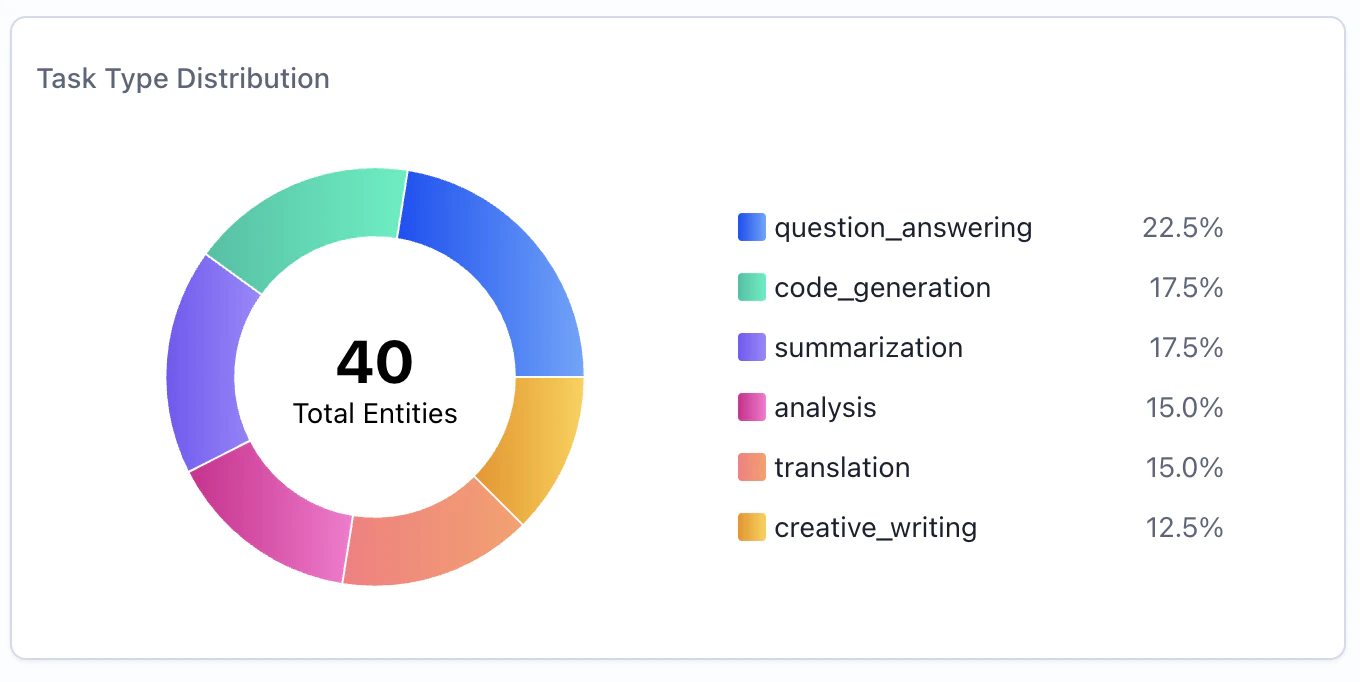
> Visualize categorical distributions as a donut/pie chart
**Using Sample Data**: The examples on this page use fields from our sample dataset. Download it and create an evaluation with it to follow along with this tutorial.
 ## When to Use
Use donut chart widgets to:
* Show proportional distribution of categories
* Visualize percentage breakdowns at a glance
* Compare relative sizes of groups
* Highlight dominant categories in your data
## Configuration
### Required Fields
Widget display name shown on the dashboard
Must be set to "donut"
SeriesQuery with `GROUP BY` for categorical breakdown
### X-Axis Configuration (One Required)
You must provide **either** `x_column` **or** `x_column_group`, but not both:
Single column name to group by for slices. Each unique value becomes a slice.
**Example:** `"task_type"` - creates slices for each task type
Array of column names for multi-dimensional grouping. Creates slices for each unique combination.
**Example:** `["agent_name", "task_type"]` - creates slices for each agent-task combination
### Query Requirements
Donut chart widgets require a **SeriesQuery** with:
* `groupBy` for categorical breakdown (required)
* At least one aggregation for slice values (`COUNT`, `SUM`, `AVG`, etc.)
* Can include `filter` to narrow the dataset
The donut chart automatically limits display to the **top 10 slices**. Any remaining categories are grouped into an "Other" slice.
## Creating in the UI
From your dashboard, click "Add Widget" and select "Donut Chart"
Give your chart a descriptive name (e.g., "Task Type Distribution")
## When to Use
Use donut chart widgets to:
* Show proportional distribution of categories
* Visualize percentage breakdowns at a glance
* Compare relative sizes of groups
* Highlight dominant categories in your data
## Configuration
### Required Fields
Widget display name shown on the dashboard
Must be set to "donut"
SeriesQuery with `GROUP BY` for categorical breakdown
### X-Axis Configuration (One Required)
You must provide **either** `x_column` **or** `x_column_group`, but not both:
Single column name to group by for slices. Each unique value becomes a slice.
**Example:** `"task_type"` - creates slices for each task type
Array of column names for multi-dimensional grouping. Creates slices for each unique combination.
**Example:** `["agent_name", "task_type"]` - creates slices for each agent-task combination
### Query Requirements
Donut chart widgets require a **SeriesQuery** with:
* `groupBy` for categorical breakdown (required)
* At least one aggregation for slice values (`COUNT`, `SUM`, `AVG`, etc.)
* Can include `filter` to narrow the dataset
The donut chart automatically limits display to the **top 10 slices**. Any remaining categories are grouped into an "Other" slice.
## Creating in the UI
From your dashboard, click "Add Widget" and select "Donut Chart"
Give your chart a descriptive name (e.g., "Task Type Distribution")
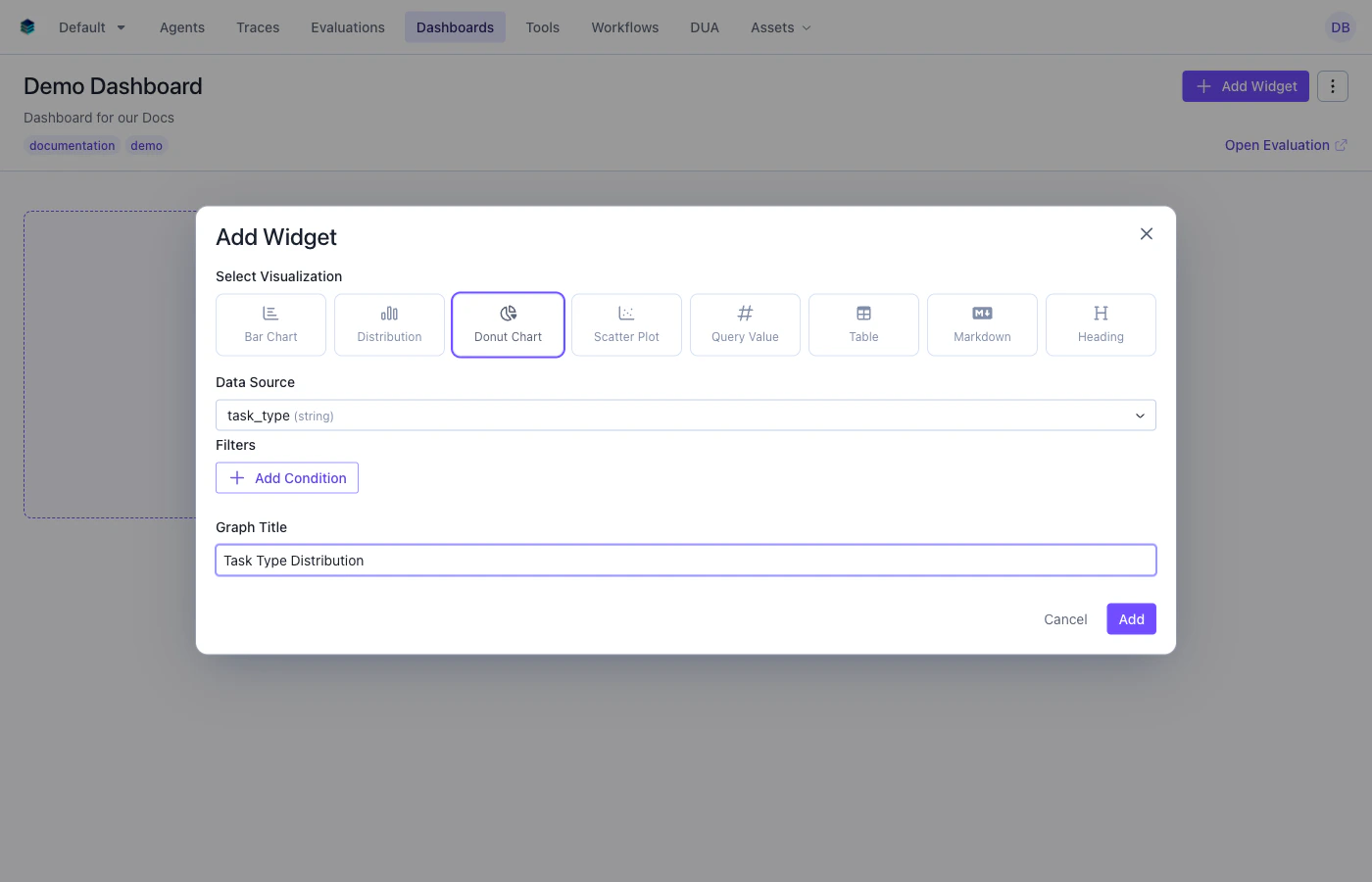 * **Group By**: Select the categorical dimension - each unique value becomes a slice
* **Aggregation**: Add a count aggregation to the query. This will be used to size the slices and is handled automatically in the UI.
* **Filter**: Add conditions to narrow the data (optional)
Click "Add" to generate the donut chart
## Output Format
Donut chart widgets use the same series format as other chart types:
```json theme={null}
{
"type": "series",
"data": [
{"task_type": "question_answering", "count": 12},
{"task_type": "summarization", "count": 8},
{"task_type": "code_generation", "count": 7},
{"task_type": "analysis", "count": 6}
]
}
```
Each data point becomes a slice, with the aggregation value determining its proportional size.
## Example Use Cases
### Use Case 1: Distribution by Task Type
Show how evaluation items are distributed across task types.
```python Python theme={null}
widget = client.evaluation_dashboards.widgets.create(
dashboard_id=dashboard.id,
title="Task Type Distribution",
type="donut",
query={
"select": [
{
"expression": {
"type": "COLUMN",
"column": "task_type",
"source": "data"
}
},
{
"expression": {
"type": "AGGREGATION",
"function": "COUNT",
"column": "*"
}
}
],
"groupBy": ["task_type"]
},
config={
"x_column": "task_type"
}
)
```
```json JSON theme={null}
{
"title": "Task Type Distribution",
"type": "donut",
"query": {
"select": [
{"expression": {"type": "COLUMN", "column": "task_type", "source": "data"}},
{"expression": {"type": "AGGREGATION", "function": "COUNT", "column": "*"}}
],
"groupBy": ["task_type"]
},
"config": {
"x_column": "task_type"
}
}
```
***
### Use Case 2: Agent Workload Distribution
Visualize how many evaluation items each agent has processed.
```python Python theme={null}
widget = client.evaluation_dashboards.widgets.create(
dashboard_id=dashboard.id,
title="Agent Workload",
type="donut",
query={
"select": [
{"expression": {"type": "COLUMN", "column": "agent_name", "source": "data"}},
{"expression": {"type": "AGGREGATION", "function": "COUNT", "column": "*"}}
],
"groupBy": ["agent_name"]
},
config={"x_column": "agent_name"}
)
```
```json JSON theme={null}
{
"title": "Agent Workload",
"type": "donut",
"query": {
"select": [
{"expression": {"type": "COLUMN", "column": "agent_name", "source": "data"}},
{"expression": {"type": "AGGREGATION", "function": "COUNT", "column": "*"}}
],
"groupBy": ["agent_name"]
},
"config": {
"x_column": "agent_name"
}
}
```
***
### Use Case 3: Prompt Category Breakdown with Filter
Show the distribution of prompt categories, filtered to only high-scoring items.
```python Python theme={null}
widget = client.evaluation_dashboards.widgets.create(
dashboard_id=dashboard.id,
title="High-Scoring Items by Category",
type="donut",
query={
"select": [
{"expression": {"type": "COLUMN", "column": "prompt_category", "source": "data"}},
{"expression": {"type": "AGGREGATION", "function": "COUNT", "column": "*"}}
],
"filter": {
"conditions": [
{"column": "overall_score", "source": "data", "operator": ">=", "value": 85}
]
},
"groupBy": ["prompt_category"]
},
config={"x_column": "prompt_category"}
)
```
```json JSON theme={null}
{
"title": "High-Scoring Items by Category",
"type": "donut",
"query": {
"select": [
{"expression": {"type": "COLUMN", "column": "prompt_category", "source": "data"}},
{"expression": {"type": "AGGREGATION", "function": "COUNT", "column": "*"}}
],
"filter": {
"conditions": [
{"column": "overall_score", "source": "data", "operator": ">=", "value": 85}
]
},
"groupBy": ["prompt_category"]
},
"config": {
"x_column": "prompt_category"
}
}
```
## Related Documentation
* [Bar Chart Widget](./bar) - For side-by-side categorical comparisons
* [Table Widget](./table) - Detailed numerical breakdowns
* [Query Language](../query-language) - `GROUP BY` and aggregation syntax
* [API Reference](/reference/v5/evaluation-dashboards) - Programmatic chart creation
* **Group By**: Select the categorical dimension - each unique value becomes a slice
* **Aggregation**: Add a count aggregation to the query. This will be used to size the slices and is handled automatically in the UI.
* **Filter**: Add conditions to narrow the data (optional)
Click "Add" to generate the donut chart
## Output Format
Donut chart widgets use the same series format as other chart types:
```json theme={null}
{
"type": "series",
"data": [
{"task_type": "question_answering", "count": 12},
{"task_type": "summarization", "count": 8},
{"task_type": "code_generation", "count": 7},
{"task_type": "analysis", "count": 6}
]
}
```
Each data point becomes a slice, with the aggregation value determining its proportional size.
## Example Use Cases
### Use Case 1: Distribution by Task Type
Show how evaluation items are distributed across task types.
```python Python theme={null}
widget = client.evaluation_dashboards.widgets.create(
dashboard_id=dashboard.id,
title="Task Type Distribution",
type="donut",
query={
"select": [
{
"expression": {
"type": "COLUMN",
"column": "task_type",
"source": "data"
}
},
{
"expression": {
"type": "AGGREGATION",
"function": "COUNT",
"column": "*"
}
}
],
"groupBy": ["task_type"]
},
config={
"x_column": "task_type"
}
)
```
```json JSON theme={null}
{
"title": "Task Type Distribution",
"type": "donut",
"query": {
"select": [
{"expression": {"type": "COLUMN", "column": "task_type", "source": "data"}},
{"expression": {"type": "AGGREGATION", "function": "COUNT", "column": "*"}}
],
"groupBy": ["task_type"]
},
"config": {
"x_column": "task_type"
}
}
```
***
### Use Case 2: Agent Workload Distribution
Visualize how many evaluation items each agent has processed.
```python Python theme={null}
widget = client.evaluation_dashboards.widgets.create(
dashboard_id=dashboard.id,
title="Agent Workload",
type="donut",
query={
"select": [
{"expression": {"type": "COLUMN", "column": "agent_name", "source": "data"}},
{"expression": {"type": "AGGREGATION", "function": "COUNT", "column": "*"}}
],
"groupBy": ["agent_name"]
},
config={"x_column": "agent_name"}
)
```
```json JSON theme={null}
{
"title": "Agent Workload",
"type": "donut",
"query": {
"select": [
{"expression": {"type": "COLUMN", "column": "agent_name", "source": "data"}},
{"expression": {"type": "AGGREGATION", "function": "COUNT", "column": "*"}}
],
"groupBy": ["agent_name"]
},
"config": {
"x_column": "agent_name"
}
}
```
***
### Use Case 3: Prompt Category Breakdown with Filter
Show the distribution of prompt categories, filtered to only high-scoring items.
```python Python theme={null}
widget = client.evaluation_dashboards.widgets.create(
dashboard_id=dashboard.id,
title="High-Scoring Items by Category",
type="donut",
query={
"select": [
{"expression": {"type": "COLUMN", "column": "prompt_category", "source": "data"}},
{"expression": {"type": "AGGREGATION", "function": "COUNT", "column": "*"}}
],
"filter": {
"conditions": [
{"column": "overall_score", "source": "data", "operator": ">=", "value": 85}
]
},
"groupBy": ["prompt_category"]
},
config={"x_column": "prompt_category"}
)
```
```json JSON theme={null}
{
"title": "High-Scoring Items by Category",
"type": "donut",
"query": {
"select": [
{"expression": {"type": "COLUMN", "column": "prompt_category", "source": "data"}},
{"expression": {"type": "AGGREGATION", "function": "COUNT", "column": "*"}}
],
"filter": {
"conditions": [
{"column": "overall_score", "source": "data", "operator": ">=", "value": 85}
]
},
"groupBy": ["prompt_category"]
},
"config": {
"x_column": "prompt_category"
}
}
```
## Related Documentation
* [Bar Chart Widget](./bar) - For side-by-side categorical comparisons
* [Table Widget](./table) - Detailed numerical breakdowns
* [Query Language](../query-language) - `GROUP BY` and aggregation syntax
* [API Reference](/reference/v5/evaluation-dashboards) - Programmatic chart creation