> ## Documentation Index
> Fetch the complete documentation index at: https://docs.gp.scale.com/llms.txt
> Use this file to discover all available pages before exploring further.
# Preview Deployments
> Spin up short-lived preview deployments per branch or PR with automatic teardown.
## Overview
Preview deployments are ephemeral Helm releases designed for testing agent changes in isolation before promoting to production. Each preview gets its own unique Helm release name, so you can run multiple previews simultaneously (one per branch, PR, or experiment) without interfering with your production deployment or with each other.
Previews are always time-boxed. Every preview deployment has an `expires_at` timestamp, defaulting to 8 hours from creation if you do not specify one. When the TTL expires, a background cleanup process automatically tears down the deployment and releases its cluster resources. You can also tear down a preview manually at any time, or promote it to a permanent production deployment when you are satisfied with the results.
## How previews differ from production
| | Production | Preview |
| ---------------------- | ----------------------------------------- | ----------------------------------------------------------- |
| Helm release name | Stable name (e.g. `customer-support-bot`) | Unique per-deploy (e.g. `customer-support-bot-pr-482-a3f9`) |
| Lifetime | Permanent until replaced | Ephemeral, auto-teardown at `expires_at` |
| Default TTL | None | 8 hours |
| `preview_label` | Not applicable | Optional grouping label (max 30 characters) |
| Simultaneous instances | One active production deployment | Multiple previews can coexist |
The unique Helm release name is what makes simultaneous previews possible. Production deployments reuse a stable release name, so deploying a new version replaces the previous one. Preview deployments append a deployment ID suffix to the release name, giving each preview its own set of Kubernetes resources.
Preview deployments are supported through the SGP dashboard UI and the [API/SDK](/docs/v5/agents/agentex/cloud-build-and-deploy/api). The `sgpctl` CLI does not currently support creating preview deployments.
## Creating a preview from the UI
From any successful build's detail page, click **Create deployment** (or use the chevron dropdown and select **Create preview deployment**). In the deploy modal, toggle **Preview deployment** to ON.
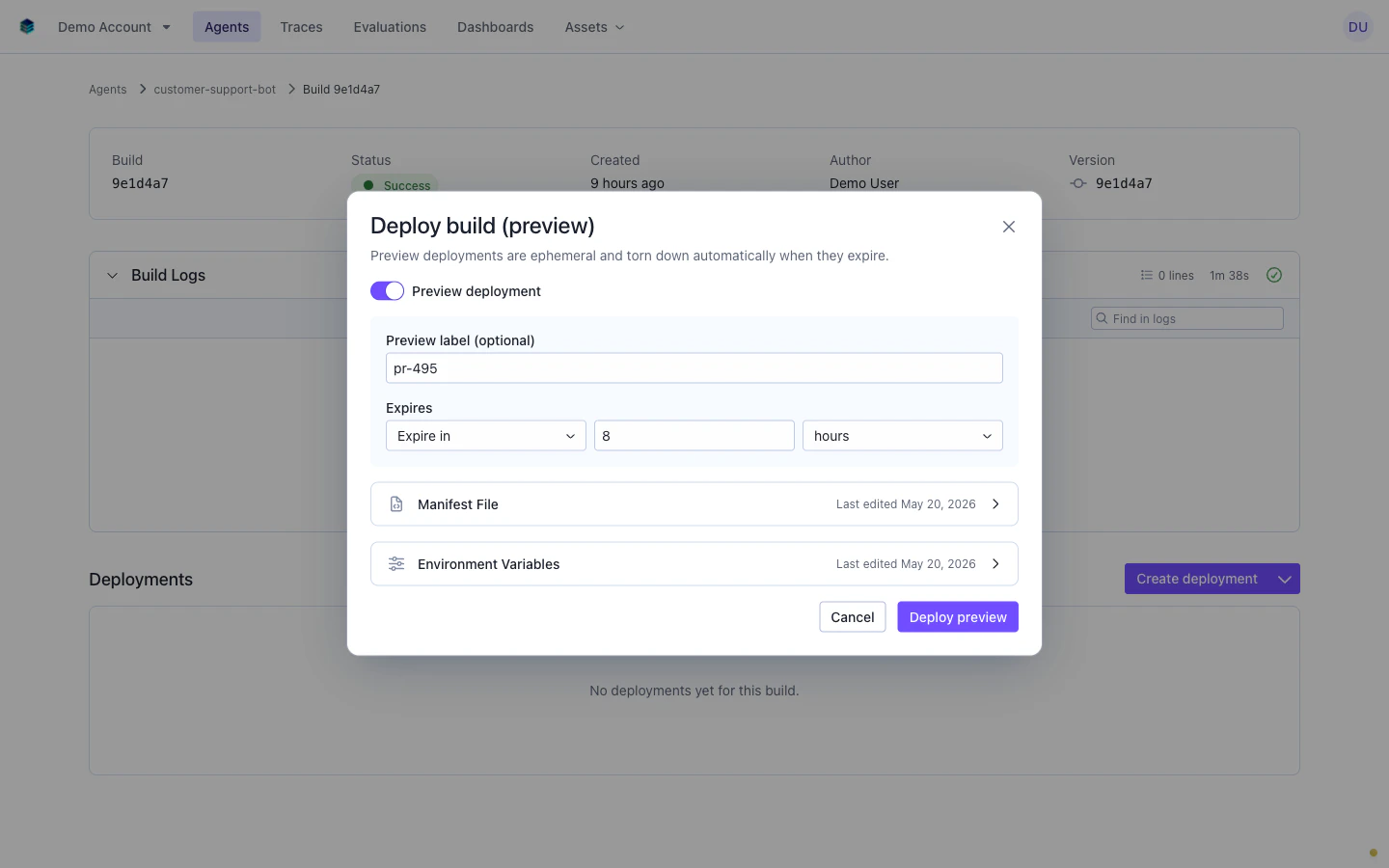 When the preview toggle is enabled, two additional fields appear:
* **Preview label**: an optional free-text label (max 30 characters) for grouping related previews. Use your branch name, PR number, or any identifier that helps you find this preview later. In the screenshot, the label is set to `pr-495`.
* **TTL**: how long the preview should live before automatic teardown. The default is 8 hours.
Click **Deploy preview** to create the deployment. The preview appears in the Deployments list on the build detail page with a **Preview** badge and an "Expires in X hours" indicator.
## Creating a preview from the API
To create a preview deployment programmatically, set `preview` to `true` in your `POST /v5/agentex/deployments` request. You can optionally include a `preview_label` and a custom `expires_at` timestamp.
```bash curl theme={null}
curl -X POST $SGP_CLIENT_BASE_URL/v5/agentex/deployments \
-H "x-api-key: $SGP_API_KEY" \
-H "x-selected-account-id: $SGP_ACCOUNT_ID" \
-H "Content-Type: application/json" \
-d '{
"manifest_file": "kind: Agent\nagent:\n name: my-agent\n...",
"environment_config": "schema_version: v1\nenvironments:\n dev.aws:\n environment: dev\n...",
"build_id": "build_abc123",
"preview": true,
"preview_label": "pr-482",
"expires_at": "2026-05-21T02:00:00Z"
}'
```
```python Python theme={null}
from datetime import datetime, timezone, timedelta
from scale_gp_beta import SGPClient
client = SGPClient(
api_key="your-api-key",
account_id="your-account-id",
)
deployment = client.deploy.create(
manifest_file="kind: Agent\nagent:\n name: my-agent\n...",
environment_config="schema_version: v1\nenvironments:\n dev.aws:\n environment: dev\n...",
build_id="build_abc123",
preview=True,
preview_label="pr-482",
expires_at=(datetime.now(timezone.utc) + timedelta(hours=8)).isoformat(),
)
print(f"Preview created: {deployment.id} (expires: {deployment.expires_at})")
```
```typescript TypeScript theme={null}
import SGPClient from 'scale-gp';
const client = new SGPClient({
apiKey: process.env.SGP_API_KEY,
accountId: process.env.SGP_ACCOUNT_ID,
});
const expiresAt = new Date(Date.now() + 8 * 60 * 60 * 1000).toISOString();
const deployment = await client.deploy.create({
manifest_file: "kind: Agent\nagent:\n name: my-agent\n...",
environment_config: "schema_version: v1\nenvironments:\n dev.aws:\n environment: dev\n...",
build_id: "build_abc123",
preview: true,
preview_label: "pr-482",
expires_at: expiresAt,
});
console.log(`Preview created: ${deployment.id} (expires: ${deployment.expires_at})`);
```
Preview deployments always have an `expires_at` value. If you omit it, the API defaults to 8 hours from the time of creation. The timestamp must be timezone-aware (include `Z` or a UTC offset like `+00:00`) and must be in the future.
Validation rules for preview-specific fields:
| Field | Rule |
| --------------- | --------------------------------------------------------------------------------------------------------------------------- |
| `preview_label` | Can only be set when `preview` is `true`. Maximum 30 characters. Non-unique; multiple deployments can share the same label. |
| `expires_at` | Can only be set when `preview` is `true`. Must be an ISO 8601 timestamp with timezone. Must be in the future. |
## Listing previews by label
The `preview_label` field is a non-unique grouping label. Multiple preview deployments can share the same label, which is useful when you redeploy the same branch multiple times. To find the latest preview for a given label, query the deployments list endpoint with the `preview_label` filter and `limit=1`.
```bash curl theme={null}
curl -s "$SGP_CLIENT_BASE_URL/v5/agentex/deployments?preview_label=pr-482&limit=1" \
-H "x-api-key: $SGP_API_KEY" \
-H "x-selected-account-id: $SGP_ACCOUNT_ID"
```
```python Python theme={null}
deployments = client.deploy.list(
preview_label="pr-482",
limit=1,
)
if deployments:
latest = deployments[0]
print(f"Latest preview: {latest.id} (status: {latest.status})")
```
```typescript TypeScript theme={null}
const deployments = await client.deploy.list({
preview_label: "pr-482",
limit: 1,
});
if (deployments.length > 0) {
const latest = deployments[0];
console.log(`Latest preview: ${latest.id} (status: ${latest.status})`);
}
```
This pattern is useful in CI pipelines. After deploying a preview, your pipeline can poll this endpoint with the branch name as the label to check deployment health before running integration tests.
## Managing preview deployments
Every preview deployment row in the Deployments list has a three-dot actions menu with operations specific to previews.
When the preview toggle is enabled, two additional fields appear:
* **Preview label**: an optional free-text label (max 30 characters) for grouping related previews. Use your branch name, PR number, or any identifier that helps you find this preview later. In the screenshot, the label is set to `pr-495`.
* **TTL**: how long the preview should live before automatic teardown. The default is 8 hours.
Click **Deploy preview** to create the deployment. The preview appears in the Deployments list on the build detail page with a **Preview** badge and an "Expires in X hours" indicator.
## Creating a preview from the API
To create a preview deployment programmatically, set `preview` to `true` in your `POST /v5/agentex/deployments` request. You can optionally include a `preview_label` and a custom `expires_at` timestamp.
```bash curl theme={null}
curl -X POST $SGP_CLIENT_BASE_URL/v5/agentex/deployments \
-H "x-api-key: $SGP_API_KEY" \
-H "x-selected-account-id: $SGP_ACCOUNT_ID" \
-H "Content-Type: application/json" \
-d '{
"manifest_file": "kind: Agent\nagent:\n name: my-agent\n...",
"environment_config": "schema_version: v1\nenvironments:\n dev.aws:\n environment: dev\n...",
"build_id": "build_abc123",
"preview": true,
"preview_label": "pr-482",
"expires_at": "2026-05-21T02:00:00Z"
}'
```
```python Python theme={null}
from datetime import datetime, timezone, timedelta
from scale_gp_beta import SGPClient
client = SGPClient(
api_key="your-api-key",
account_id="your-account-id",
)
deployment = client.deploy.create(
manifest_file="kind: Agent\nagent:\n name: my-agent\n...",
environment_config="schema_version: v1\nenvironments:\n dev.aws:\n environment: dev\n...",
build_id="build_abc123",
preview=True,
preview_label="pr-482",
expires_at=(datetime.now(timezone.utc) + timedelta(hours=8)).isoformat(),
)
print(f"Preview created: {deployment.id} (expires: {deployment.expires_at})")
```
```typescript TypeScript theme={null}
import SGPClient from 'scale-gp';
const client = new SGPClient({
apiKey: process.env.SGP_API_KEY,
accountId: process.env.SGP_ACCOUNT_ID,
});
const expiresAt = new Date(Date.now() + 8 * 60 * 60 * 1000).toISOString();
const deployment = await client.deploy.create({
manifest_file: "kind: Agent\nagent:\n name: my-agent\n...",
environment_config: "schema_version: v1\nenvironments:\n dev.aws:\n environment: dev\n...",
build_id: "build_abc123",
preview: true,
preview_label: "pr-482",
expires_at: expiresAt,
});
console.log(`Preview created: ${deployment.id} (expires: ${deployment.expires_at})`);
```
Preview deployments always have an `expires_at` value. If you omit it, the API defaults to 8 hours from the time of creation. The timestamp must be timezone-aware (include `Z` or a UTC offset like `+00:00`) and must be in the future.
Validation rules for preview-specific fields:
| Field | Rule |
| --------------- | --------------------------------------------------------------------------------------------------------------------------- |
| `preview_label` | Can only be set when `preview` is `true`. Maximum 30 characters. Non-unique; multiple deployments can share the same label. |
| `expires_at` | Can only be set when `preview` is `true`. Must be an ISO 8601 timestamp with timezone. Must be in the future. |
## Listing previews by label
The `preview_label` field is a non-unique grouping label. Multiple preview deployments can share the same label, which is useful when you redeploy the same branch multiple times. To find the latest preview for a given label, query the deployments list endpoint with the `preview_label` filter and `limit=1`.
```bash curl theme={null}
curl -s "$SGP_CLIENT_BASE_URL/v5/agentex/deployments?preview_label=pr-482&limit=1" \
-H "x-api-key: $SGP_API_KEY" \
-H "x-selected-account-id: $SGP_ACCOUNT_ID"
```
```python Python theme={null}
deployments = client.deploy.list(
preview_label="pr-482",
limit=1,
)
if deployments:
latest = deployments[0]
print(f"Latest preview: {latest.id} (status: {latest.status})")
```
```typescript TypeScript theme={null}
const deployments = await client.deploy.list({
preview_label: "pr-482",
limit: 1,
});
if (deployments.length > 0) {
const latest = deployments[0];
console.log(`Latest preview: ${latest.id} (status: ${latest.status})`);
}
```
This pattern is useful in CI pipelines. After deploying a preview, your pipeline can poll this endpoint with the branch name as the label to check deployment health before running integration tests.
## Managing preview deployments
Every preview deployment row in the Deployments list has a three-dot actions menu with operations specific to previews.
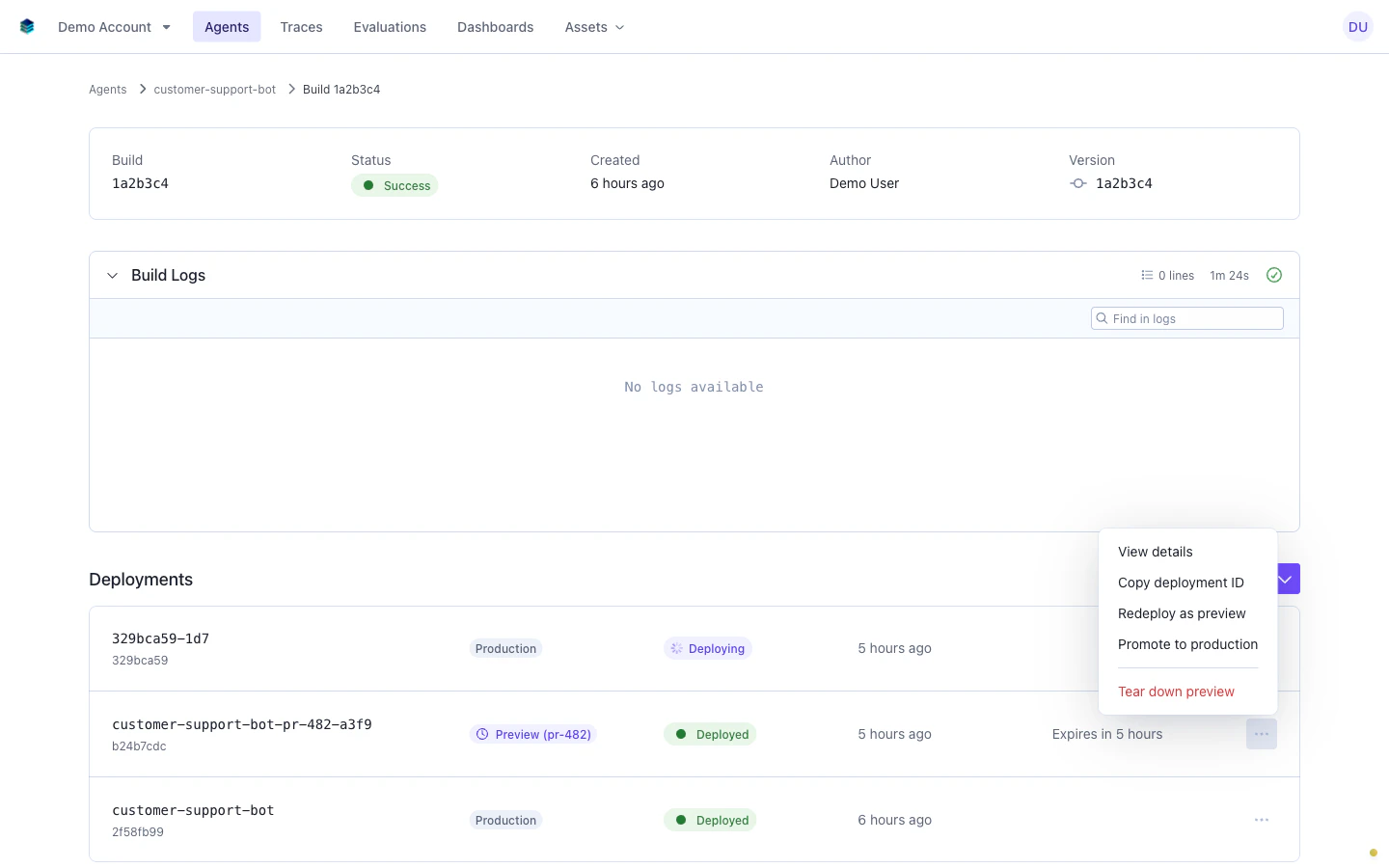 The available actions are:
### Promote to production
Select **Promote to production** to create a new permanent deployment with the same manifest and environment configuration as the preview.
The available actions are:
### Promote to production
Select **Promote to production** to create a new permanent deployment with the same manifest and environment configuration as the preview.
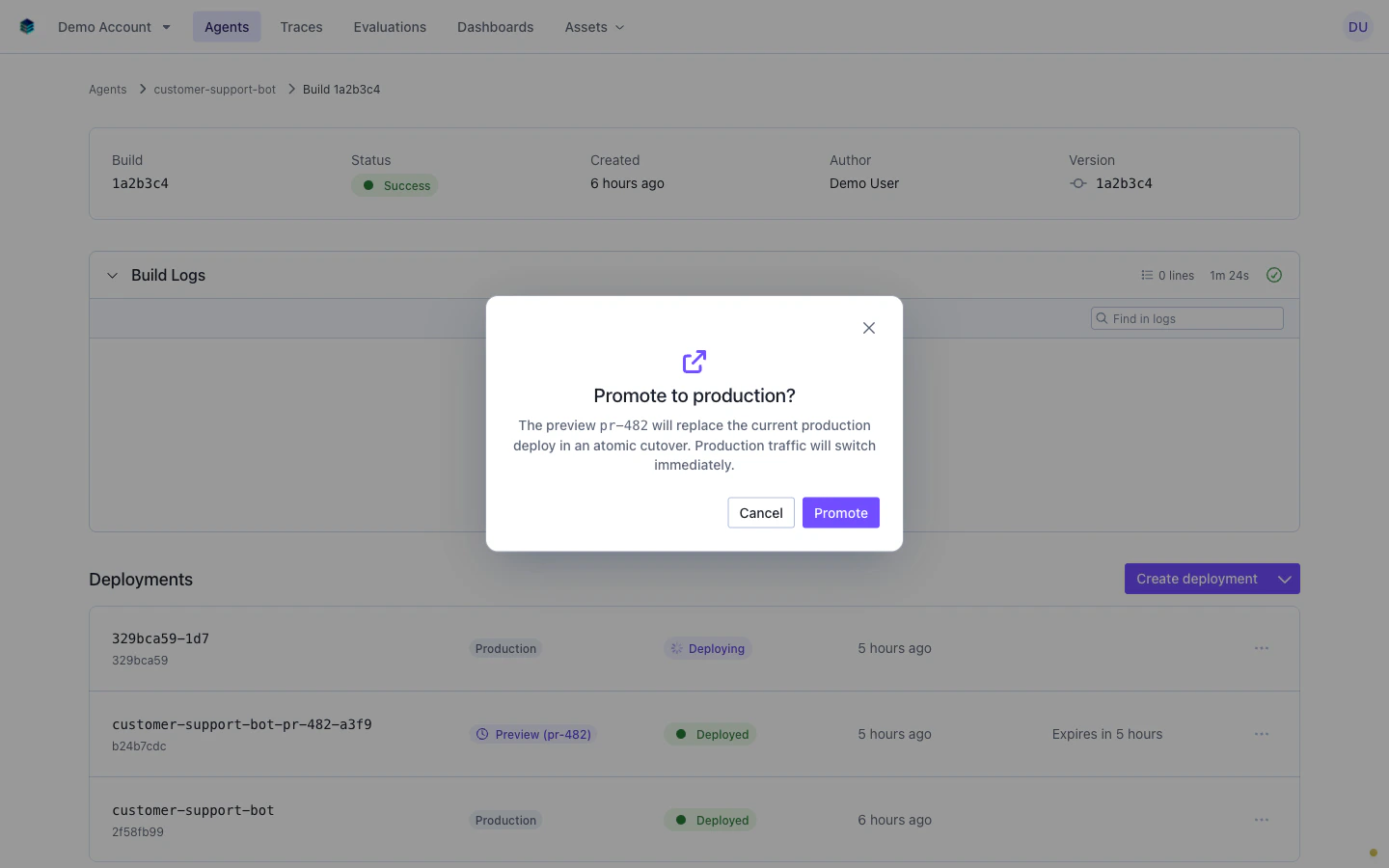 Promoting creates a new production deployment. The original preview deployment is not automatically torn down. It continues to run until its TTL expires or you tear it down manually. This lets you verify the production deployment is healthy before cleaning up the preview.
### Tear down preview
Select **Tear down preview** to immediately delete the deployment and release its cluster resources. A confirmation dialog appears before the teardown proceeds.
Promoting creates a new production deployment. The original preview deployment is not automatically torn down. It continues to run until its TTL expires or you tear it down manually. This lets you verify the production deployment is healthy before cleaning up the preview.
### Tear down preview
Select **Tear down preview** to immediately delete the deployment and release its cluster resources. A confirmation dialog appears before the teardown proceeds.
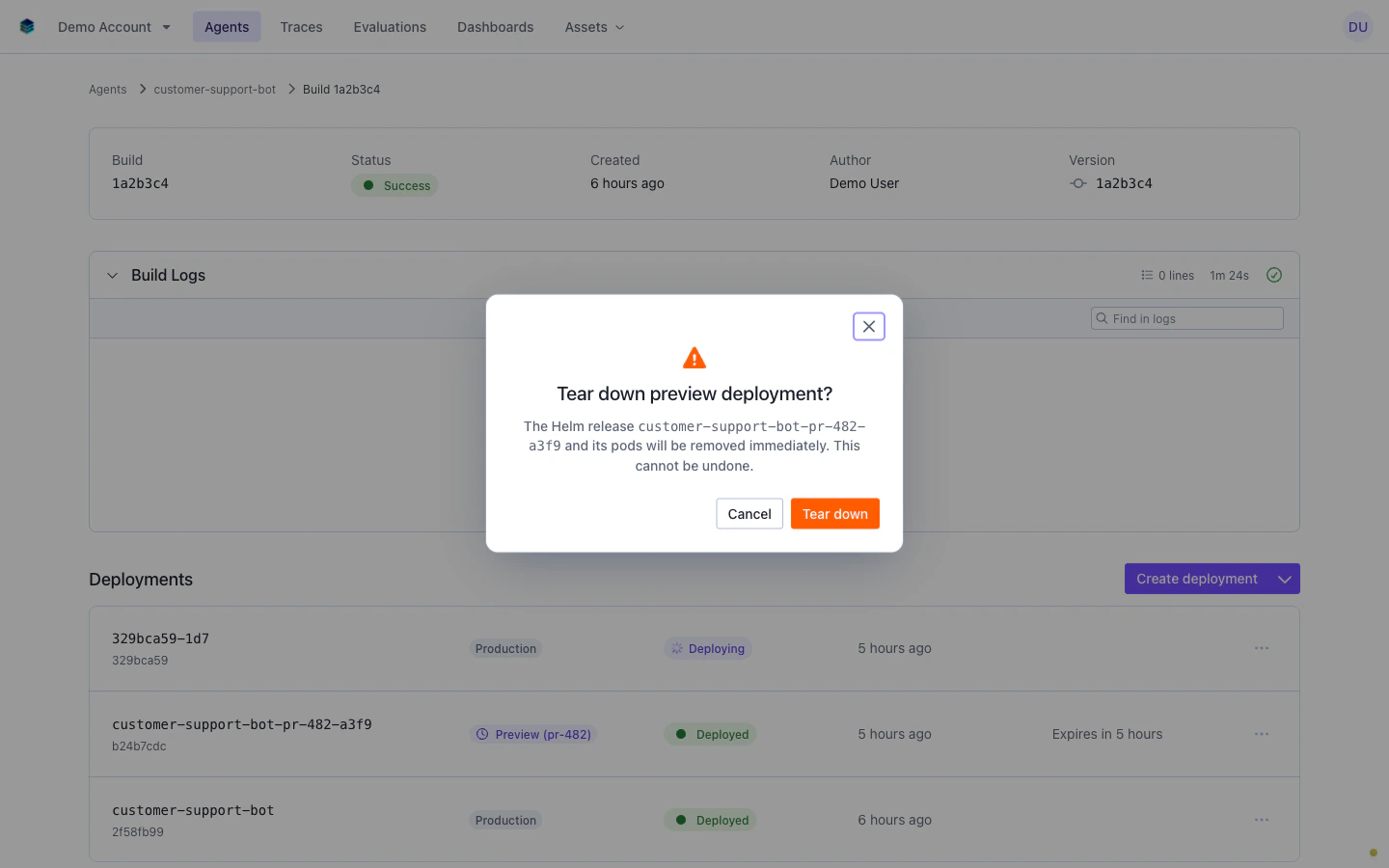 Once torn down, the deployment transitions to a terminal state and its Kubernetes resources are removed. This action cannot be undone. If you need the same configuration again, use **Redeploy as preview** on a previous deployment or create a new preview from the build detail page.
### Redeploy as preview
Select **Redeploy as preview** to open the deploy modal pre-filled with the preview's configuration, including the `preview_label` from the original deployment. This is a shortcut for redeploying the same branch after a code change without re-entering the configuration.
## TTL and expiration
Every preview deployment has an `expires_at` timestamp that controls its lifetime. When you create a preview without specifying `expires_at`, the API defaults to 8 hours from the time of creation.
In the SGP dashboard, preview deployments display an "Expires in X hours" badge so you can see at a glance how much time remains. As the TTL approaches, the badge counts down.
When the `expires_at` time is reached, a background cleanup process automatically tears down the preview deployment and releases its cluster resources. You do not need to take any action. Expired previews are cleaned up automatically.
If you need more time with a preview, create a new preview deployment with a longer TTL. You cannot extend the `expires_at` of an existing preview. The new preview can reuse the same `preview_label` so it remains easy to find via the API.
Automatic teardown is handled by a background process that runs periodically. There may be a short delay between the `expires_at` timestamp and the actual resource cleanup, but the preview will stop serving traffic at expiration.
## CI/CD integration
Preview deployments work well in CI/CD pipelines for automated branch testing. A typical pattern is:
1. On push to a feature branch, build the agent image
2. Deploy the image as a preview with `preview_label` set to the branch name
3. Poll the deployments endpoint to confirm the preview is healthy
4. Run integration tests against the preview endpoint
5. On merge to main, deploy to production (the preview expires naturally or can be torn down)
Here is a simplified workflow snippet showing the deploy and verify steps:
```bash theme={null}
# Build the JSON payload safely so YAML newlines and quotes are escaped
PAYLOAD=$(jq -n \
--rawfile manifest manifest.yaml \
--rawfile env environments.yaml \
--arg build_id "$BUILD_ID" \
--arg label "$BRANCH_NAME" \
'{manifest_file: $manifest, environment_config: $env, build_id: $build_id, preview: true, preview_label: $label}')
# After a successful build, deploy as preview
DEPLOY_RESPONSE=$(curl -s -X POST $SGP_CLIENT_BASE_URL/v5/agentex/deployments \
-H "x-api-key: $SGP_API_KEY" \
-H "x-selected-account-id: $SGP_ACCOUNT_ID" \
-H "Content-Type: application/json" \
-d "$PAYLOAD")
DEPLOY_ID=$(echo "$DEPLOY_RESPONSE" | jq -r '.id')
# Poll until the preview is healthy or failed
while true; do
STATUS=$(curl -s "$SGP_CLIENT_BASE_URL/v5/agentex/deployments/$DEPLOY_ID" \
-H "x-api-key: $SGP_API_KEY" \
-H "x-selected-account-id: $SGP_ACCOUNT_ID" \
| jq -r '.status')
echo "Preview deploy status: $STATUS"
case $STATUS in
healthy) echo "Preview is live"; break ;;
failed|cancelled) echo "Preview deploy failed"; exit 1 ;;
esac
sleep 10
done
```
Set the `preview_label` to your branch name or PR number in CI. This makes it straightforward to look up the latest preview for any branch using the list endpoint with the label filter, and it keeps the SGP dashboard organized when multiple branches have active previews.
## Next steps
* [API and SDK](/docs/v5/agents/agentex/cloud-build-and-deploy/api): full request and response schemas for preview deployment fields
* [CI/CD with Gitea Actions](/docs/v5/agents/agentex/cloud-build-and-deploy/ci-cd): workflow templates for automated builds
* [Secrets](/docs/v5/agents/agentex/cloud-build-and-deploy/secrets): store and reference credentials used during deployments
Once torn down, the deployment transitions to a terminal state and its Kubernetes resources are removed. This action cannot be undone. If you need the same configuration again, use **Redeploy as preview** on a previous deployment or create a new preview from the build detail page.
### Redeploy as preview
Select **Redeploy as preview** to open the deploy modal pre-filled with the preview's configuration, including the `preview_label` from the original deployment. This is a shortcut for redeploying the same branch after a code change without re-entering the configuration.
## TTL and expiration
Every preview deployment has an `expires_at` timestamp that controls its lifetime. When you create a preview without specifying `expires_at`, the API defaults to 8 hours from the time of creation.
In the SGP dashboard, preview deployments display an "Expires in X hours" badge so you can see at a glance how much time remains. As the TTL approaches, the badge counts down.
When the `expires_at` time is reached, a background cleanup process automatically tears down the preview deployment and releases its cluster resources. You do not need to take any action. Expired previews are cleaned up automatically.
If you need more time with a preview, create a new preview deployment with a longer TTL. You cannot extend the `expires_at` of an existing preview. The new preview can reuse the same `preview_label` so it remains easy to find via the API.
Automatic teardown is handled by a background process that runs periodically. There may be a short delay between the `expires_at` timestamp and the actual resource cleanup, but the preview will stop serving traffic at expiration.
## CI/CD integration
Preview deployments work well in CI/CD pipelines for automated branch testing. A typical pattern is:
1. On push to a feature branch, build the agent image
2. Deploy the image as a preview with `preview_label` set to the branch name
3. Poll the deployments endpoint to confirm the preview is healthy
4. Run integration tests against the preview endpoint
5. On merge to main, deploy to production (the preview expires naturally or can be torn down)
Here is a simplified workflow snippet showing the deploy and verify steps:
```bash theme={null}
# Build the JSON payload safely so YAML newlines and quotes are escaped
PAYLOAD=$(jq -n \
--rawfile manifest manifest.yaml \
--rawfile env environments.yaml \
--arg build_id "$BUILD_ID" \
--arg label "$BRANCH_NAME" \
'{manifest_file: $manifest, environment_config: $env, build_id: $build_id, preview: true, preview_label: $label}')
# After a successful build, deploy as preview
DEPLOY_RESPONSE=$(curl -s -X POST $SGP_CLIENT_BASE_URL/v5/agentex/deployments \
-H "x-api-key: $SGP_API_KEY" \
-H "x-selected-account-id: $SGP_ACCOUNT_ID" \
-H "Content-Type: application/json" \
-d "$PAYLOAD")
DEPLOY_ID=$(echo "$DEPLOY_RESPONSE" | jq -r '.id')
# Poll until the preview is healthy or failed
while true; do
STATUS=$(curl -s "$SGP_CLIENT_BASE_URL/v5/agentex/deployments/$DEPLOY_ID" \
-H "x-api-key: $SGP_API_KEY" \
-H "x-selected-account-id: $SGP_ACCOUNT_ID" \
| jq -r '.status')
echo "Preview deploy status: $STATUS"
case $STATUS in
healthy) echo "Preview is live"; break ;;
failed|cancelled) echo "Preview deploy failed"; exit 1 ;;
esac
sleep 10
done
```
Set the `preview_label` to your branch name or PR number in CI. This makes it straightforward to look up the latest preview for any branch using the list endpoint with the label filter, and it keeps the SGP dashboard organized when multiple branches have active previews.
## Next steps
* [API and SDK](/docs/v5/agents/agentex/cloud-build-and-deploy/api): full request and response schemas for preview deployment fields
* [CI/CD with Gitea Actions](/docs/v5/agents/agentex/cloud-build-and-deploy/ci-cd): workflow templates for automated builds
* [Secrets](/docs/v5/agents/agentex/cloud-build-and-deploy/secrets): store and reference credentials used during deployments