> ## Documentation Index
> Fetch the complete documentation index at: https://docs.gp.scale.com/llms.txt
> Use this file to discover all available pages before exploring further.
# CI/CD with Gitea Actions
> Automate agent builds and deployments with the provided Gitea Actions workflow templates.
## Overview
The agentex-agents repository template ships with three Gitea Actions workflows that automate the build and deploy lifecycle for your agents. These workflows use the SGP Build and Deploy API to package your agent source code into container images and deploy them to SGP-managed Kubernetes clusters.
Out of the box, merging to `main` triggers an automatic build and deploy. Pushes to feature branches trigger build-only validation. You can also trigger builds and deploys manually via workflow dispatch.
You do not need to write these workflows from scratch. The template repository includes them pre-configured. Your responsibility is to understand when each workflow runs, how to configure your agent directories, and how to set up the required secrets.
## How it works
When you push code that changes an agent, the CI/CD pipeline detects the change, builds a container image, and (on the main branch) deploys it. The following diagram shows the end-to-end flow for a merge to main:
```mermaid theme={null}
flowchart LR
A[Push to main] --> B[Detect changed agents]
B --> C[Package build context]
C --> D[POST /v5/builds]
D --> E[Poll build status]
E --> F{Build succeeded?}
F -- Yes --> G[POST /v5/agentex/deployments]
F -- No --> H[Fail workflow]
G --> I[Poll deploy status]
I --> J{Deploy healthy?}
J -- Yes --> K[Agent serving traffic]
J -- No --> L[Fetch logs & fail]
```
The pipeline auto-detects which agents changed by running `git diff` against the previous commit. Only agents with modified files are built, so a single push that touches multiple agents triggers parallel builds for each one.
## The three workflows
The template repository includes three workflow files under `.gitea/workflows/`. Each serves a different purpose in the development lifecycle.
| Workflow | Trigger | Builds? | Deploys? | Use case |
| ------------------------------------- | ----------------------------------------------- | ------- | -------- | ------------------------------------------- |
| `cloud-build.yaml` | Push to non-main branches (agent paths) | Yes | No | Validate builds on feature branches |
| `cloud-build-and-deploy-on-push.yaml` | Push to `main` (agent paths) or manual dispatch | Yes | Yes | Build and deploy on merge to main |
| `cloud-deploy.yaml` | Manual dispatch or workflow call | No | Yes | Deploy a specific image version or rollback |
### cloud-build.yaml: build on feature branches
This workflow triggers on pushes to any branch **except main** when files under `teams/**/agents/**` change. It auto-detects which agents were modified, packages the build context for each one, and submits a build request to the SGP Build API via `POST /v5/builds`. The workflow polls the build status until it succeeds or fails, with a 600-second timeout.
This workflow does not deploy. Its purpose is to validate that your agent builds successfully before you merge.
### cloud-build-and-deploy-on-push.yaml: build and deploy on main
This workflow triggers when files under `teams/**/agents/**` change on the main branch, or via manual dispatch. It builds container images for all changed agents and then deploys them.
For each agent, the workflow:
1. Packages the build context based on the agent's `manifest.yaml` build configuration
2. Submits the build to `POST /v5/builds` and polls until complete
3. Reads the agent's `manifest.yaml` and `environments.yaml`
4. Submits a deployment to `POST /v5/agentex/deployments` with the resulting `build_id`
5. Polls the deployment status until it reaches `healthy` or fails
The workflow uses a `resolve_inputs.py` helper script to derive the image name from the `agent.name` field in the manifest and to auto-select the environment from `environments.yaml` (auto-selected when only one environment is defined, which is the typical case).
### cloud-deploy.yaml: standalone deploy
This workflow is manual-only. It deploys an existing image without rebuilding. You can trigger it via manual dispatch or call it from another workflow using `workflow_call`.
Inputs include:
* `agent-path` (required): path to the agent directory
* `agent-environment` (required): environment key from `environments.yaml`
* `build-id` OR `image-name` + `image-tag`: specify either a previous build ID or a direct image reference
The workflow submits `POST /v5/agentex/deployments`, polls until the deployment is healthy, and fetches deploy logs on failure.
Use the standalone deploy workflow for rollbacks. If a deployment fails, you can redeploy the previous known-good build by providing its `build-id`.
## Workflow runs
After a workflow triggers, you can monitor its progress in the Gitea Actions UI. Each workflow run shows the individual steps, their status, and logs for each stage of the build and deploy process.
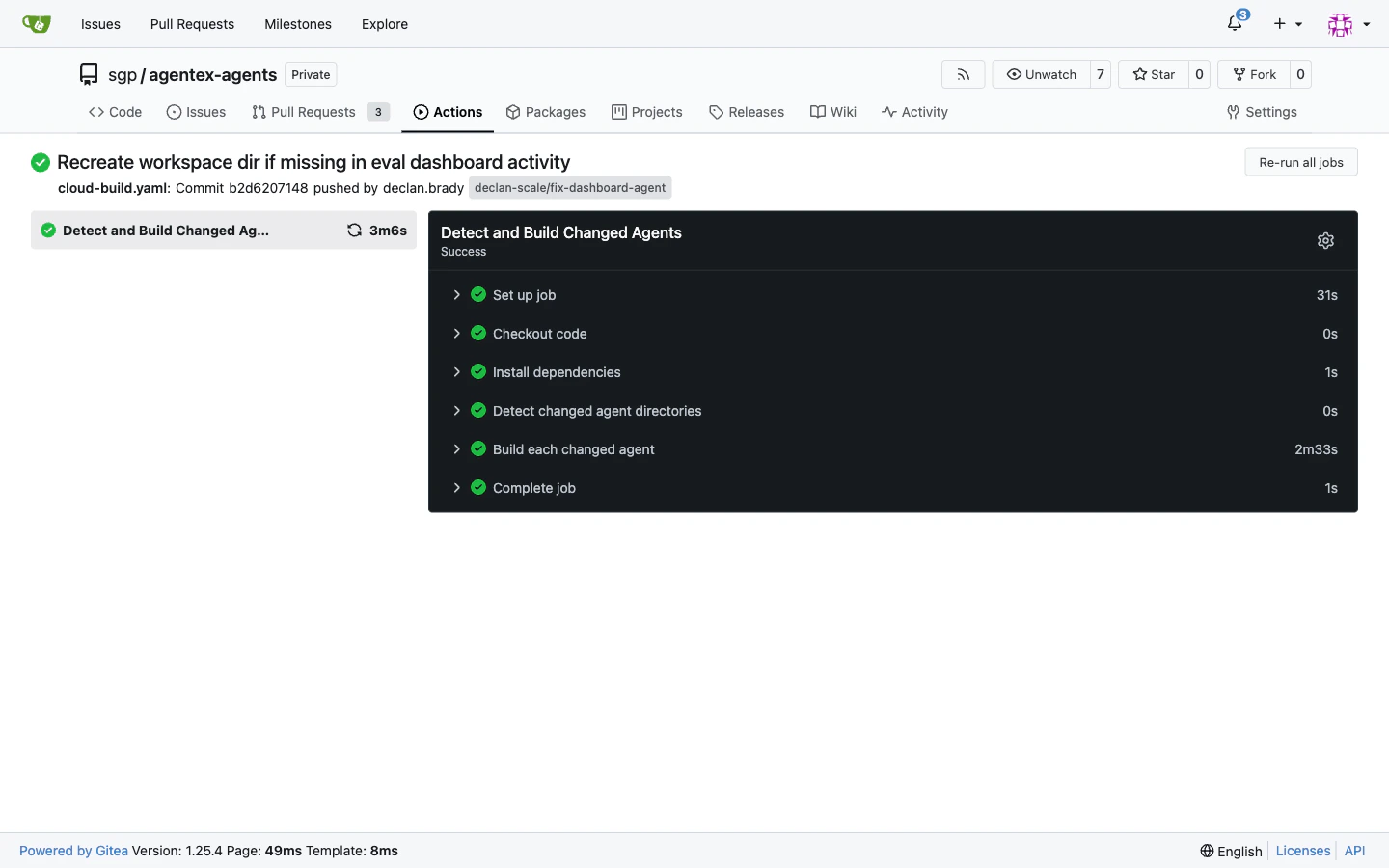 The workflow run page displays:
* Each step in the pipeline with pass/fail indicators
* Timing information for build and deploy phases
* Console output for debugging failed steps
If a build or deployment fails, expand the failed step to see the error output. Common failures include Dockerfile syntax errors, missing dependencies, and secret reference mismatches.
## Manual dispatch
You can trigger a build and deploy for a specific agent without pushing code by using the manual dispatch form in Gitea Actions.
The workflow run page displays:
* Each step in the pipeline with pass/fail indicators
* Timing information for build and deploy phases
* Console output for debugging failed steps
If a build or deployment fails, expand the failed step to see the error output. Common failures include Dockerfile syntax errors, missing dependencies, and secret reference mismatches.
## Manual dispatch
You can trigger a build and deploy for a specific agent without pushing code by using the manual dispatch form in Gitea Actions.
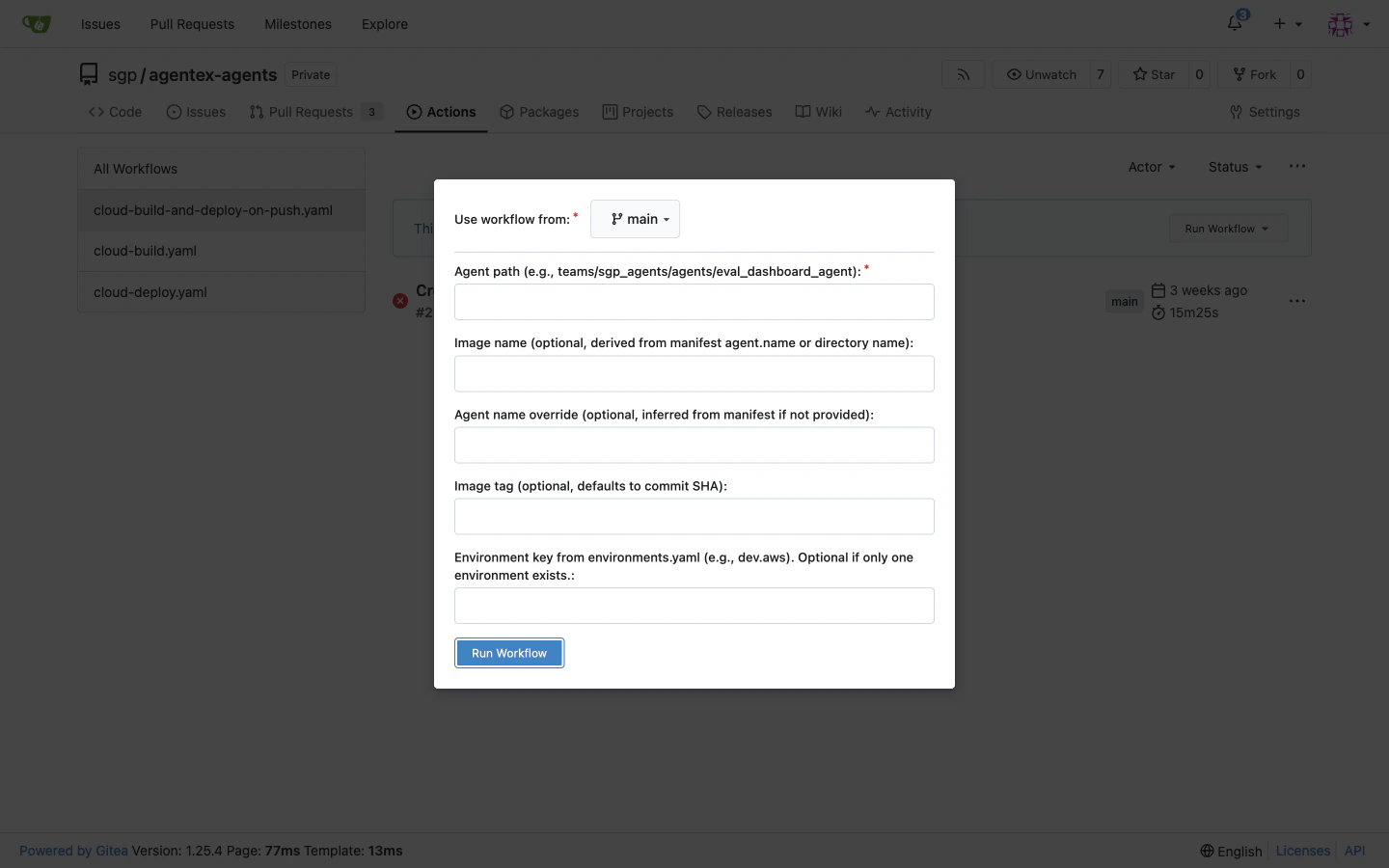 To trigger a manual dispatch:
1. Navigate to the **Actions** tab in your Gitea repository
2. Select the `cloud-build-and-deploy-on-push.yaml` workflow (or `cloud-deploy.yaml` for deploy-only)
3. Click **Run workflow**
4. Fill in the inputs:
* **agent-path** (required): the path to your agent directory (for example, `teams/my-team/agents/my-agent`)
* **image-name** (optional): overrides the image name derived from `manifest.yaml`. Should match the `agent.name` in your manifest.
* **agent-name** (optional): overrides the agent name. Should match `image-name` (the `resolve_inputs.py` helper sets both to the same value by default).
* **image-tag** (optional): overrides the auto-generated tag. Use a version number (e.g., `v1.2.0`) or a commit SHA. Defaults to the current commit SHA.
* **agent-environment** (optional): must match an environment key in your `environments.yaml`. Auto-selected when only one environment is defined.
5. Click **Run workflow** to start the pipeline
Manual dispatch is useful during initial setup, testing, or when you need to deploy a specific image tag. For routine development, merging to main triggers the build and deploy automatically.
## Repository structure
The CI/CD workflows expect a specific directory layout. Each agent lives in its own directory under `teams//agents//` and contains the configuration files the workflows need.
```
teams/
my-team/
agents/
my-agent/
manifest.yaml # Build and agent configuration
environments.yaml # Deployment settings (namespace, resources, etc.)
Dockerfile # Container build instructions
.dockerignore # Files to exclude from build context
src/
main.py # Agent source code
requirements.txt # Python dependencies
...
another-agent/
manifest.yaml
environments.yaml
Dockerfile
src/
...
```
The workflows detect changes at the `teams/**/agents/**` path level. When you push a commit that modifies any file inside an agent directory, the corresponding workflow picks up that agent for building.
## manifest.yaml
The `manifest.yaml` file defines your agent's identity, build context, credentials, and deployment defaults. It is the primary configuration file the CI/CD workflows read when building and deploying your agent.
```yaml theme={null}
kind: Agent
build:
context:
# Root directory for the build context, relative to the agent directory
root: ../
# Paths to include in the build context (relative to root)
include_paths:
- golden_agent
# Path to the Dockerfile (relative to root)
dockerfile: golden_agent/Dockerfile
# Path to the .dockerignore file (relative to root)
dockerignore: golden_agent/.dockerignore
agent:
# Agent Communication Protocol type: "async" or "sync"
acp_type: async
# Unique agent name (used as the image name by default)
name: golden-agent
# Human-readable description shown in the SGP dashboard
description: Generic Claude Agent SDK harness.
# Temporal workflow configuration (for async agents)
temporal:
enabled: true
workflows:
- name: GoldenAgentWorkflow
queue_name: golden_agent_queue
# Secrets injected as environment variables at runtime
credentials:
- env_var_name: ANTHROPIC_API_KEY
secret_name: anthropic-api-key
secret_key: api-key
deployment:
image:
# Left empty; populated by the CI/CD pipeline
repository: ""
tag: "latest"
imagePullSecrets:
- name: agentex-acr-pull-secret
global:
replicaCount: 1
resources:
requests:
cpu: "500m"
memory: "1Gi"
limits:
cpu: "1000m"
memory: "2Gi"
```
### Key fields
**`build.context`** controls what files are sent to the cloud build service. Set `root` to the common ancestor directory, then use `include_paths` to specify which subdirectories to include. The `dockerfile` and `dockerignore` paths are relative to `root`.
**`agent`** defines the agent's identity and runtime configuration:
* `acp_type` determines whether the agent uses synchronous request-response (`sync`) or asynchronous task-based (`async`) communication.
* `name` is used as the default image name and must be unique within your account.
* `temporal` configures Temporal workflow settings for async agents. Each workflow entry specifies the workflow class name and task queue.
* `credentials` maps secrets stored in SGP to environment variables in the running container. Each entry references a secret by name and key, and injects it as the specified environment variable. See [Secrets](/docs/v5/agents/agentex/cloud-build-and-deploy/secrets) for how to create and manage these secrets.
**`deployment`** sets default resource requests and replica counts. These values can be overridden in `environments.yaml`.
The `deployment.image.repository` field is intentionally left empty. The CI/CD pipeline populates it automatically with the managed registry path during the build phase.
## environments.yaml
The `environments.yaml` file defines deployment settings for your agent's target environment: the Kubernetes namespace, authentication principal, resource limits, and Helm value overrides.
The file has a top-level `environments` map with a named key for each environment. In practice, you define one environment per agent. The key name (e.g., `dev.aws` below) is arbitrary; the CI/CD pipeline's `resolve_inputs.py` helper auto-selects it when only one environment is defined.
```yaml theme={null}
schema_version: "v1"
environments:
dev.aws:
environment: dev
kubernetes:
namespace: "sgp-golden-agent"
auth:
principal:
user_id: ac48a4a5-ca7f-4fcd-9724-f08dbc6b081f
account_id: 69c69407ee5d19e1dce57d57
helm_overrides:
command:
- uvicorn
- project.acp:acp
- --host
- 0.0.0.0
- --port
- "8000"
replicas: 1
resources:
requests:
cpu: 500m
memory: 1Gi
limits:
cpu: 1000m
memory: 2Gi
temporal-worker:
enabled: true
replicaCount: 1
resources:
requests:
cpu: 500m
memory: 1Gi
limits:
cpu: 1000m
memory: 2Gi
env:
- name: SGP_ACCOUNT_ID
value: "69c69407ee5d19e1dce57d57"
- name: SGP_CLIENT_BASE_URL
value: "http://egp-api-backend.egp.svc.cluster.local:80/public"
```
### Key fields
**`kubernetes.namespace`** determines where the agent's pods, services, and other resources are created.
**`auth.principal`** provides the `user_id` and `account_id` used to authenticate API calls. These must correspond to a valid SGP service account with permissions to create deployments.
**`helm_overrides`** lets you customize the container command, resource requests and limits, replica counts, Temporal worker configuration, and environment variables. Values specified here take precedence over the defaults in `manifest.yaml`. The `env` field uses array format (`[{name: X, value: Y}]`) for environment variables injected into the running container.
## Required secrets
The CI/CD workflows authenticate with the SGP API using secrets stored in your Gitea repository's Actions settings. You must configure the following secrets before the workflows can run.
| Secret | Description |
| ---------------- | ------------------------------------------------------------ |
| `SGP_API_KEY` | API key for authenticating with the SGP Build and Deploy API |
| `SGP_ACCOUNT_ID` | Your SGP account identifier |
To add these secrets:
1. Navigate to your Gitea repository settings
2. Go to **Actions** > **Secrets**
3. Add `SGP_API_KEY` with your SGP API key value
4. Add `SGP_ACCOUNT_ID` with your account ID
The workflows use the in-cluster API base URL `http://egp-api-backend.egp.svc.cluster.local/public` by default. This is pre-configured in the workflow files and does not require a separate secret. If your cluster uses a different service address, update the `SGP_BASE_URL` variable in the workflow files directly.
These repository-level secrets are different from the agent-level secrets defined in `manifest.yaml`. Repository secrets authenticate the CI/CD pipeline itself, while agent secrets (in the `credentials` section of `manifest.yaml`) are injected into the running agent container at runtime.
## Adding a new agent
To add a new agent to the CI/CD pipeline:
1. **Create the agent directory** under your team's path:
```bash theme={null}
mkdir -p teams/my-team/agents/my-new-agent/src
```
2. **Add a `manifest.yaml`** with your agent's build context, name, and configuration. Use the example above as a starting point and update the `agent.name`, `build.context` paths, and `credentials` section for your agent.
3. **Add an `environments.yaml`** with your deployment target configuration. Set the `namespace`, `auth.principal`, and any `helm_overrides` for your environment.
4. **Add a `Dockerfile`** and `.dockerignore` at the paths referenced in your `manifest.yaml`. The Dockerfile should produce a container that runs your agent.
5. **Add your agent source code** under `src/` or wherever your Dockerfile expects it.
6. **Push to a feature branch** to trigger `cloud-build.yaml`. Verify that the build completes successfully in the Gitea Actions UI.
7. **Merge to main** to trigger `cloud-build-and-deploy-on-push.yaml`, which builds the agent and deploys it automatically using the configuration in `environments.yaml`.
8. **Verify the deployment** in the SGP dashboard. Navigate to your agent's detail page to confirm the deployment status is `healthy`.
Ensure your `manifest.yaml` references only secrets that have already been created in SGP. A deployment will fail if it references a secret that does not exist. See [Secrets](/docs/v5/agents/agentex/cloud-build-and-deploy/secrets) for setup instructions.
## Next steps
* [API and SDK](/docs/v5/agents/agentex/cloud-build-and-deploy/api): access builds and deployments programmatically
* [sgpctl CLI](/docs/v5/agents/agentex/cloud-build-and-deploy/sgpctl): build, deploy, and inspect agents from the terminal
* [Secrets](/docs/v5/agents/agentex/cloud-build-and-deploy/secrets): create and rotate credentials referenced in `manifest.yaml`
To trigger a manual dispatch:
1. Navigate to the **Actions** tab in your Gitea repository
2. Select the `cloud-build-and-deploy-on-push.yaml` workflow (or `cloud-deploy.yaml` for deploy-only)
3. Click **Run workflow**
4. Fill in the inputs:
* **agent-path** (required): the path to your agent directory (for example, `teams/my-team/agents/my-agent`)
* **image-name** (optional): overrides the image name derived from `manifest.yaml`. Should match the `agent.name` in your manifest.
* **agent-name** (optional): overrides the agent name. Should match `image-name` (the `resolve_inputs.py` helper sets both to the same value by default).
* **image-tag** (optional): overrides the auto-generated tag. Use a version number (e.g., `v1.2.0`) or a commit SHA. Defaults to the current commit SHA.
* **agent-environment** (optional): must match an environment key in your `environments.yaml`. Auto-selected when only one environment is defined.
5. Click **Run workflow** to start the pipeline
Manual dispatch is useful during initial setup, testing, or when you need to deploy a specific image tag. For routine development, merging to main triggers the build and deploy automatically.
## Repository structure
The CI/CD workflows expect a specific directory layout. Each agent lives in its own directory under `teams//agents//` and contains the configuration files the workflows need.
```
teams/
my-team/
agents/
my-agent/
manifest.yaml # Build and agent configuration
environments.yaml # Deployment settings (namespace, resources, etc.)
Dockerfile # Container build instructions
.dockerignore # Files to exclude from build context
src/
main.py # Agent source code
requirements.txt # Python dependencies
...
another-agent/
manifest.yaml
environments.yaml
Dockerfile
src/
...
```
The workflows detect changes at the `teams/**/agents/**` path level. When you push a commit that modifies any file inside an agent directory, the corresponding workflow picks up that agent for building.
## manifest.yaml
The `manifest.yaml` file defines your agent's identity, build context, credentials, and deployment defaults. It is the primary configuration file the CI/CD workflows read when building and deploying your agent.
```yaml theme={null}
kind: Agent
build:
context:
# Root directory for the build context, relative to the agent directory
root: ../
# Paths to include in the build context (relative to root)
include_paths:
- golden_agent
# Path to the Dockerfile (relative to root)
dockerfile: golden_agent/Dockerfile
# Path to the .dockerignore file (relative to root)
dockerignore: golden_agent/.dockerignore
agent:
# Agent Communication Protocol type: "async" or "sync"
acp_type: async
# Unique agent name (used as the image name by default)
name: golden-agent
# Human-readable description shown in the SGP dashboard
description: Generic Claude Agent SDK harness.
# Temporal workflow configuration (for async agents)
temporal:
enabled: true
workflows:
- name: GoldenAgentWorkflow
queue_name: golden_agent_queue
# Secrets injected as environment variables at runtime
credentials:
- env_var_name: ANTHROPIC_API_KEY
secret_name: anthropic-api-key
secret_key: api-key
deployment:
image:
# Left empty; populated by the CI/CD pipeline
repository: ""
tag: "latest"
imagePullSecrets:
- name: agentex-acr-pull-secret
global:
replicaCount: 1
resources:
requests:
cpu: "500m"
memory: "1Gi"
limits:
cpu: "1000m"
memory: "2Gi"
```
### Key fields
**`build.context`** controls what files are sent to the cloud build service. Set `root` to the common ancestor directory, then use `include_paths` to specify which subdirectories to include. The `dockerfile` and `dockerignore` paths are relative to `root`.
**`agent`** defines the agent's identity and runtime configuration:
* `acp_type` determines whether the agent uses synchronous request-response (`sync`) or asynchronous task-based (`async`) communication.
* `name` is used as the default image name and must be unique within your account.
* `temporal` configures Temporal workflow settings for async agents. Each workflow entry specifies the workflow class name and task queue.
* `credentials` maps secrets stored in SGP to environment variables in the running container. Each entry references a secret by name and key, and injects it as the specified environment variable. See [Secrets](/docs/v5/agents/agentex/cloud-build-and-deploy/secrets) for how to create and manage these secrets.
**`deployment`** sets default resource requests and replica counts. These values can be overridden in `environments.yaml`.
The `deployment.image.repository` field is intentionally left empty. The CI/CD pipeline populates it automatically with the managed registry path during the build phase.
## environments.yaml
The `environments.yaml` file defines deployment settings for your agent's target environment: the Kubernetes namespace, authentication principal, resource limits, and Helm value overrides.
The file has a top-level `environments` map with a named key for each environment. In practice, you define one environment per agent. The key name (e.g., `dev.aws` below) is arbitrary; the CI/CD pipeline's `resolve_inputs.py` helper auto-selects it when only one environment is defined.
```yaml theme={null}
schema_version: "v1"
environments:
dev.aws:
environment: dev
kubernetes:
namespace: "sgp-golden-agent"
auth:
principal:
user_id: ac48a4a5-ca7f-4fcd-9724-f08dbc6b081f
account_id: 69c69407ee5d19e1dce57d57
helm_overrides:
command:
- uvicorn
- project.acp:acp
- --host
- 0.0.0.0
- --port
- "8000"
replicas: 1
resources:
requests:
cpu: 500m
memory: 1Gi
limits:
cpu: 1000m
memory: 2Gi
temporal-worker:
enabled: true
replicaCount: 1
resources:
requests:
cpu: 500m
memory: 1Gi
limits:
cpu: 1000m
memory: 2Gi
env:
- name: SGP_ACCOUNT_ID
value: "69c69407ee5d19e1dce57d57"
- name: SGP_CLIENT_BASE_URL
value: "http://egp-api-backend.egp.svc.cluster.local:80/public"
```
### Key fields
**`kubernetes.namespace`** determines where the agent's pods, services, and other resources are created.
**`auth.principal`** provides the `user_id` and `account_id` used to authenticate API calls. These must correspond to a valid SGP service account with permissions to create deployments.
**`helm_overrides`** lets you customize the container command, resource requests and limits, replica counts, Temporal worker configuration, and environment variables. Values specified here take precedence over the defaults in `manifest.yaml`. The `env` field uses array format (`[{name: X, value: Y}]`) for environment variables injected into the running container.
## Required secrets
The CI/CD workflows authenticate with the SGP API using secrets stored in your Gitea repository's Actions settings. You must configure the following secrets before the workflows can run.
| Secret | Description |
| ---------------- | ------------------------------------------------------------ |
| `SGP_API_KEY` | API key for authenticating with the SGP Build and Deploy API |
| `SGP_ACCOUNT_ID` | Your SGP account identifier |
To add these secrets:
1. Navigate to your Gitea repository settings
2. Go to **Actions** > **Secrets**
3. Add `SGP_API_KEY` with your SGP API key value
4. Add `SGP_ACCOUNT_ID` with your account ID
The workflows use the in-cluster API base URL `http://egp-api-backend.egp.svc.cluster.local/public` by default. This is pre-configured in the workflow files and does not require a separate secret. If your cluster uses a different service address, update the `SGP_BASE_URL` variable in the workflow files directly.
These repository-level secrets are different from the agent-level secrets defined in `manifest.yaml`. Repository secrets authenticate the CI/CD pipeline itself, while agent secrets (in the `credentials` section of `manifest.yaml`) are injected into the running agent container at runtime.
## Adding a new agent
To add a new agent to the CI/CD pipeline:
1. **Create the agent directory** under your team's path:
```bash theme={null}
mkdir -p teams/my-team/agents/my-new-agent/src
```
2. **Add a `manifest.yaml`** with your agent's build context, name, and configuration. Use the example above as a starting point and update the `agent.name`, `build.context` paths, and `credentials` section for your agent.
3. **Add an `environments.yaml`** with your deployment target configuration. Set the `namespace`, `auth.principal`, and any `helm_overrides` for your environment.
4. **Add a `Dockerfile`** and `.dockerignore` at the paths referenced in your `manifest.yaml`. The Dockerfile should produce a container that runs your agent.
5. **Add your agent source code** under `src/` or wherever your Dockerfile expects it.
6. **Push to a feature branch** to trigger `cloud-build.yaml`. Verify that the build completes successfully in the Gitea Actions UI.
7. **Merge to main** to trigger `cloud-build-and-deploy-on-push.yaml`, which builds the agent and deploys it automatically using the configuration in `environments.yaml`.
8. **Verify the deployment** in the SGP dashboard. Navigate to your agent's detail page to confirm the deployment status is `healthy`.
Ensure your `manifest.yaml` references only secrets that have already been created in SGP. A deployment will fail if it references a secret that does not exist. See [Secrets](/docs/v5/agents/agentex/cloud-build-and-deploy/secrets) for setup instructions.
## Next steps
* [API and SDK](/docs/v5/agents/agentex/cloud-build-and-deploy/api): access builds and deployments programmatically
* [sgpctl CLI](/docs/v5/agents/agentex/cloud-build-and-deploy/sgpctl): build, deploy, and inspect agents from the terminal
* [Secrets](/docs/v5/agents/agentex/cloud-build-and-deploy/secrets): create and rotate credentials referenced in `manifest.yaml`