> ## Documentation Index
> Fetch the complete documentation index at: https://docs.gp.scale.com/llms.txt
> Use this file to discover all available pages before exploring further.
# Knowledge Bases
> A knowledge base is a centralized repository for information. Knowledge bases allow you to store, organize, and provide access to information (ingest and query on your data).
## What is a knowledge base?
A knowledge base consists of a single [vector store](https://scale-egp.readme.io/docs/vector-stores-intro) along with several [data connectors](https://scale-egp.readme.io/docs/data-connectors) that point to different external data sources. As shown in the diagram below, knowledge bases are a fundamental component of the SGP API ecosystem as you need a knowledge base to ingest data through a data connector.
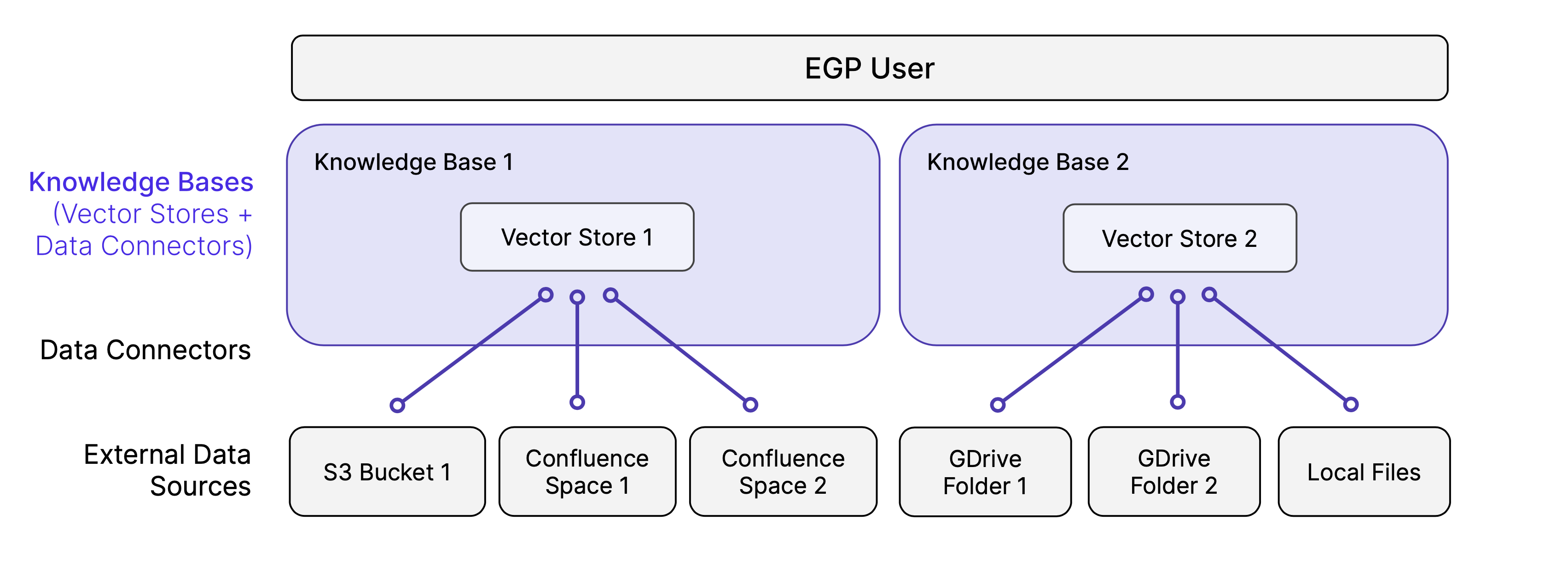 **How are knowledge bases related to vector stores?** Every knowledge base has one [vector store](https://scale-egp.readme.io/docs/vector-stores-intro) under the hood. Any data that is imported or ingested into a knowledge base will be embedded and stored in its vector store.
**How are knowledge bases related to data connectors?** When you create a data connector, you associated it with a single knowledge base. Any data that is ingested via that data connector will be stored in its associated knowledge base.
## Creating a new knowledge base in the UI
To create a new knowledge base, you need to:
1. Define a Knowledge Base Name.
2. Select an Embedding Model.
3. Select a Data Source.
4. Configure Upload Source.
### Knowledge Base Name
This will be used to locate your knowledge base after you create it.
### Embedding Model
Embedding models are ML models that convert text into a numerical representation. The representation is then used to compare and match text data. You can select an existing model on the SGP Platform or install a new model and use the new model.
### Data Source
Data sources provide the data for knowledge bases to ingest. When a knowledge base upload is created from a data source, it will read data from it, extract text from relevant files, split it into chunks, embed the chunks, and store the embeddings in a vector database for future retrieval.
### Configure Upload
Upload configurations define how the data source is split into chunks. The chunking configuration affects the relevance of the content retrieved from a knowledge base when the LLM is used to embed content. You can choose to go with the default configuration or choose your own Chunk Strategy, Size, Overlap, and Separator.
## Knowledge Base API
The starter code below creates an SGP knowledge base using the [Create Knowledge Base](/reference/knowledge-bases/create-knowledge-base) endpoint. Fill in your API key and choose a name for your knowledge base, and try out the starter code below!
```Python Python theme={null}
import requests
# Replace this with your SGP API key
# See instructions for getting your API key here: scale-egp.readme.io/docs/getting-started
API_KEY = '[Your API key]'
# Choose a name for your knowledge base
KNOWLEDGE_BASE_NAME = "my_knowledge_base_1"
# Select an embedding model of the two options listed below
EMBEDDING_MODEL = "openai/text-embedding-ada-002" # or "sentence-transformers/all-MiniLM-L12-v2"
print(f"Creating a knowledge base named {KNOWLEDGE_BASE_NAME}...")
url = "https://api.sgp.scale.com/v3/knowledge-bases"
payload = {
"embedding_config": {
"type": "base",
"embedding_model": "openai/text-embedding-3-large"
},
"knowledge_base_name": "myknowledge_base"
}
headers = {
"accept": "application/json",
"content-type": "application/json",
"x-api-key": API_KEY
}
response = requests.post(url, json=payload, headers=headers)
print(f"Response: {response.text}")
```
You should see a response like the following, which will show your knowledge base ID.
`{"knowledge_base_id":"clk123456789"}`
Keep this value—you will need it later when getting information about your knowledge base, creating data connectors, and more.
**How are knowledge bases related to vector stores?** Every knowledge base has one [vector store](https://scale-egp.readme.io/docs/vector-stores-intro) under the hood. Any data that is imported or ingested into a knowledge base will be embedded and stored in its vector store.
**How are knowledge bases related to data connectors?** When you create a data connector, you associated it with a single knowledge base. Any data that is ingested via that data connector will be stored in its associated knowledge base.
## Creating a new knowledge base in the UI
To create a new knowledge base, you need to:
1. Define a Knowledge Base Name.
2. Select an Embedding Model.
3. Select a Data Source.
4. Configure Upload Source.
### Knowledge Base Name
This will be used to locate your knowledge base after you create it.
### Embedding Model
Embedding models are ML models that convert text into a numerical representation. The representation is then used to compare and match text data. You can select an existing model on the SGP Platform or install a new model and use the new model.
### Data Source
Data sources provide the data for knowledge bases to ingest. When a knowledge base upload is created from a data source, it will read data from it, extract text from relevant files, split it into chunks, embed the chunks, and store the embeddings in a vector database for future retrieval.
### Configure Upload
Upload configurations define how the data source is split into chunks. The chunking configuration affects the relevance of the content retrieved from a knowledge base when the LLM is used to embed content. You can choose to go with the default configuration or choose your own Chunk Strategy, Size, Overlap, and Separator.
## Knowledge Base API
The starter code below creates an SGP knowledge base using the [Create Knowledge Base](/reference/knowledge-bases/create-knowledge-base) endpoint. Fill in your API key and choose a name for your knowledge base, and try out the starter code below!
```Python Python theme={null}
import requests
# Replace this with your SGP API key
# See instructions for getting your API key here: scale-egp.readme.io/docs/getting-started
API_KEY = '[Your API key]'
# Choose a name for your knowledge base
KNOWLEDGE_BASE_NAME = "my_knowledge_base_1"
# Select an embedding model of the two options listed below
EMBEDDING_MODEL = "openai/text-embedding-ada-002" # or "sentence-transformers/all-MiniLM-L12-v2"
print(f"Creating a knowledge base named {KNOWLEDGE_BASE_NAME}...")
url = "https://api.sgp.scale.com/v3/knowledge-bases"
payload = {
"embedding_config": {
"type": "base",
"embedding_model": "openai/text-embedding-3-large"
},
"knowledge_base_name": "myknowledge_base"
}
headers = {
"accept": "application/json",
"content-type": "application/json",
"x-api-key": API_KEY
}
response = requests.post(url, json=payload, headers=headers)
print(f"Response: {response.text}")
```
You should see a response like the following, which will show your knowledge base ID.
`{"knowledge_base_id":"clk123456789"}`
Keep this value—you will need it later when getting information about your knowledge base, creating data connectors, and more.